Asked By
miniangel
10 points
N/A
Posted on - 08/26/2011

Hi There!
Hello, I cannot reinstall my computer in this time. Because desktop has important 2 files. If I setup windows then my data will be erased.
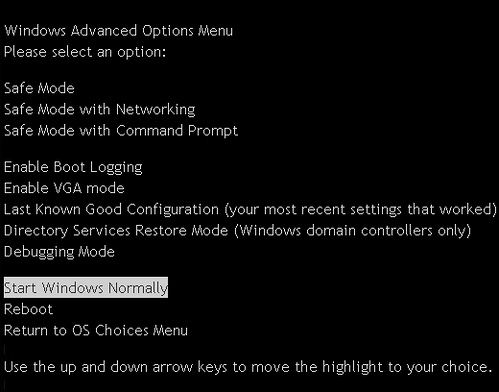
Problem:
When turning on my PC then it prompts me: please run your computer in sate mood. But why?
What is safe mood option?
Windows prompt me to use operating system in safe mode
Every Windows operating system has a safe mode option. While your computer is in this state, it only loads a few drivers. You can do modification on the registry and you can load and remove certain drivers. One of the reason that safe mode appears is when an expected shut down occurs. You can just choose the option “Start Windows Normally” Here are the description of each options.
-
Safe Mode, if this options is selected, only a minimal set of driver and services are loaded when Windows starts.
-
Safe Mode with Networking, if this options is selected, only a minimal set of drivers and services are loaded together with the drivers that is needed to enable networking when Windows starts.
-
Safe Mode with Command Prompt, when this option is selected, its functionality is the same with option one “Safe Mode” but the command prompt is loaded on start up instead of the Windows Explorer.
-
Enable Boot Logging, starts the logging on computer startup. You can see logged files under System root folder (Ntbtlog.txt)
-
Enable VGA Mode, if you are having a problem on your monitor, you can choose this option.
-
Last Known Good Configuration, this loads your previous working configuration.
-
Directory Service Restore Mode, this option is for the service repair of the directory.
-
Debugging Mode, this option is for Windows debugging.
-
Starts Windows Normally, Loads the Windows in normal state.
-
Reboot, restart the computer.
-
Return to OS Choices Menu, an option for the Boot Menu. This is used by a computer with multiple operating systems.
Answered By
Trevor
0 points
N/A
#91192
Windows prompt me to use operating system in safe mode
You are prompted to boot on safe mode because there were developed errors in your operating system. Some drivers are not working properly or some files that is being used by your operating system. Safe is created for troubleshoot purpose; it loads only minimal drivers and resources for you to give chance in running some utilities.
You can choose to run in Normal mode but it is not advisable action to be done. Better to run in safe mode and then when you have already in safe mode restart your computer. Windows operating system automatically fixed errors even if you are not doing something inside the safe mode especial video configuration problems.
If your operating system required you to boot again in safe mode after restarting from safe mode, boot again in safe mode then under safe mode run the check disk to fix some other problems in your operating system. Open your command prompt then on the command prompt type CHKDSK /F. This will schedule the check disk to run during start-up at once to fix some issues.
















