Hi,
I've been getting an error while updating my desktop computer that I haven’t been using in a while. I haven’t used it for like 6 months, and when I try to update my desktop computer I get this:
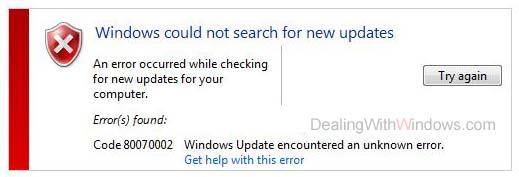
Windows could not search for new updates
An error occurred while checking for new update for your computer
Error(s) found:
Code 80070002 Windows Update encountered an unknown error.
Get help with this error
I am not sure how I can skip or download the following update to get rid of that error. The solutions given by the Microsoft website doesn’t seem to work for me.
Windows could not search for new updates Code 80070002
I have something to resolve your problem. Go to start menu/computer now open that drive where window is installed. Open the windows folder and locate the (SOFTWARE DISTRIBUTION ) folder. Now open the download folder. Now open the installed folder. Only 1 file is there right click and select (RUN AS ADMINISTRATOR).Now you are working as administrator now run the installation using default values and click yes for the license.
After the installation completes restart your PC.
Hope this will help you.
Answered By
Noel Sam
10 points
N/A
#83162
Windows could not search for new updates Code 80070002
This problem occurs for some temporary update files; however I have the solution for you. You just read my instructions carefully.
When you received Windows Update error message 80070002 while checking for updating, and then you need to remove your temporary update files from your computer which is used for identifying for your computer. For removing the temporary files from your computer, first you have to stop the windows update service and then delete the temporary update files, then restart the windows update service. Then try to check for your windows update I mean which you expect for updating.
How to delete your windows update temporary file for your computer, just follow below instruction.
-
Go to My Computer, insert your local drive where your windows are installed.
-
Enter windows folder and then find the Software Distribution folder and enter that folder.
-
Then find Data Store folder and enter that folder, here you may see huge folder and file. Now you have to select all folders and files by pressing “Ctrl+A” and then delete all files and folders.
-
Now go back to the Software Distribution folder and open the download folder and then delete all files and folders.
Thank You.
Windows could not search for new updates Code 80070002
This problem occurs for some temporary update files; however here provided all solutions are good but besides these have many ways to resolve this issue. You just visit this Techyv page "An error occurred while checking for new updates for your compute…" and read those instructions carefully.