Asked By
luke foster
0 points
N/A
Posted on - 01/30/2012

I am trying to make a GIF image in Photoshop. I used Adobe Bridge CS5.
When I attempt to open Bridge with Photoshop, I got an undefined error.
I was unable to open Bridge so I try re-installing, but that did not resolve my problem.
What should I do next?
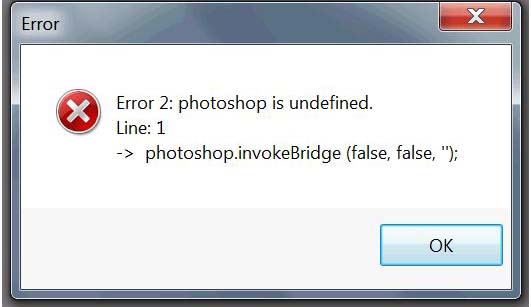
Error
Error 2: Photoshop is undefined.
Line: 1
>photoshop.invokeBridge (false, false, “);
OK
Undefined Error in Adobe Bridge and Photoshop CS5
Adobe Photoshop CS5 system requirements:
Mac
Multi-core Intel processorMac OS X 10.5.7 or 10.6.3
1 GB RAM
2 GB available hard drive space
1024 x 768 screen resolution or 1280 x 800 recommended
16-bit, 256 MB video card with hardware accelerated OpenGL 2.0 and Shader Model 3.0
DVD optical drive
QuickTime 7.6.2 or higher
Windows
Pentium 4, AMD Athlon 64, or faster processorWindows XP Service Pack 3
Windows Vista Home Premium/Business/Ultimate/Enterprise Service Pack 2
Windows 7
1 GB RAM
1 GB available hard disk space
1024 x 768 screen resolution or 1280 x 800 recommended
16-bit, 256 MB video card with hardware accelerated OpenGL 2.0 and Shader Model 3.0
DVD optical drive
QuickTime 7.6.2 or higher
It seems that Adobe Bridge CS5 is included in some other Adobe products and here you are using Adobe Photoshop. Check the compatibility of the operating system you are using by checking your computer’s hardware and platform specifications with the above lists. If you think there’s no problem with your system’s compatibility, then try checking your computer for any possible errors it might have. Use a disk utility application to check your system. If you don’t have one installed on your computer, just use Windows’ disk check tool.
Right-click drive C then select Properties.
Click Tools tab.
Click Check Now.
Check Automatically fix file system errors then click Start.
For a more effective diagnostic and thorough checking, install a disk utility application on your computer like Norton Utilities 15.0, for example.
Undefined Error in Adobe Bridge and Photoshop CS5
It seems that you do not have bridge icon on the desktop. Open the Win XP and then navigate to program files. Finally scroll down to bridges and reset preferences. Hold down control key and click on bridge icon. You will get a reset windows with around 3 options.
Waters Magner
Undefined Error in Adobe Bridge and Photoshop CS5
Hi
he easiest way to possibly fix it is to install the latest update for Adobe Bridge. Update for Adobe Bridge is available at Adobe Product Updates. Scroll down and look for Adobe Bridge.
For more information visit this link : Photoshop CS5 error need help
















