No of visitors who read this post: 529
Type: Question
No votes yet

Hi everyone,

I was provided some executables when I get LabVIEW or the LabVIEW Run-Time Engine installed on my computer system. When I try to start the executables, I get a message which states that an additional component is urgently needed. The NI is prompting to provide me the chance to visit the NI website for downloading the suitable software required to open my executable.

How can I get rid of this? Can you please suggest some solution for this. Thanks a lot.
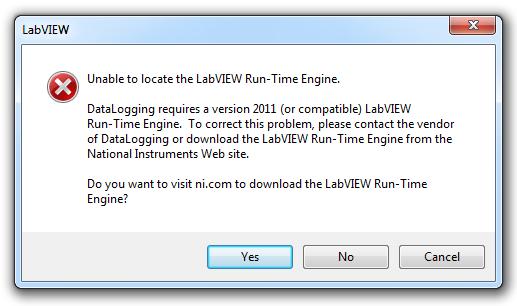
Error:

Unable to locate the LabVIEW Run-Time Engine.

DataLogging requires a version 2011(or compatible)LabVIEW Run-Time Engin.To correct this problem,please contact the vendor of DataLogging or download the LabVIEW Run-Time Engine from the National Instruments Web site.

Do you want to visit ni.com to download the LabVIW Run-Time Engine?

Comment viewing options

Select your preferred way to display the comments and click "Save settings" to activate your changes.

#

Sometimes executables distributed to customers without having any LabVIEW or the LabVIEW Run-Time Engine installed on their computers. When all of these customers endeavor to run the executable, then the costumers will receive a prompt saying an additional component needed. 
 
For this reason, NI has revised this prompt to give customers the option of visiting the NI website to download the appropriate software needed to run their executable.
 
 
Any purchase of LabVIEW software includes a yearly subscription. This subscription is the NI Standard Service Program (SSP). Through NI’s membership, everybody is entitled to yearly releases of LabVIEW and scheduled maintenance releases. NI’s includes worldwide maintain their services from NI applications engineer.
 
You can install and activate LabVIEW 2011 now with an active membership.