
Hello guys,
I have recently installed the Vodafone mobile connect software on my system.
I faced no trouble at all in installing it, but when I try to launch it, it results in an error on my screen.
The screenshot of the error is attached below:
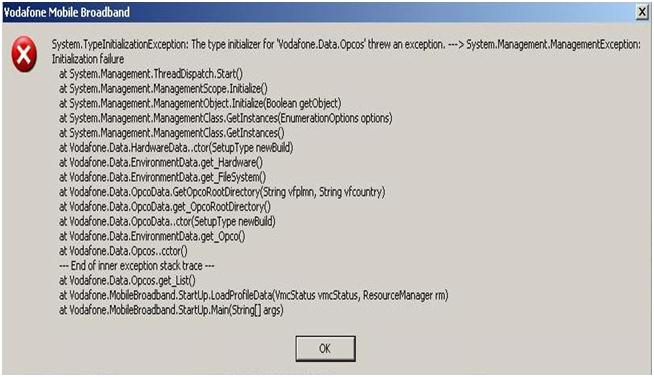
System.TypeInitializationException: The type initialization for ‘Vodafone.Data.Opcos’ threw an exception. —> System.Management.ManagementException:
I am using version 10.2 of the software. I uninstalled and then, installed it again, but still I was met with the same error. I have also reloaded Microsoft .net version 2 and version 3, but all my efforts failed. I then restored the system, but in vain.
I am using Lenovo X220 windows XP Sp3 and checkpoint full disk encryption.
Any ideas as to why this error is appearing on my screen?
Please guide me to resolve the error.
Thank you.
Trouble in launching Vodafone mobile connect software on my system
Hi Fidel,
I understand how frustrating when you thought all are setup and you expect everything should run smoothly and did not. If I understand you correctly, you have tried installing different software as well and reinstall your windows right? You have just done a great job isolating the issue. What media you are using to install the Vodafone Mobile Connect software and the Microsoft .net version? Here are simple recommendations I want you to try.
If it is from a installation cd, you try installing it on a different system.
If it’s a download try a different website.
I would also advice to purchase a registry cleaner online, just to make sure everything is being checked.
I know these are basic troubleshooting steps that you do not want to try, but they might lead us to the solution. Running isolation test usually works.
Trouble in launching Vodafone mobile connect software on my system
That error looks like a compatibility error or caused by a program that did not install or uninstall correctly but if you said you are using Microsoft Windows XP Service Pack 3 then this shouldn’t be happening. The Vodafone Mobile Broadband software supports Windows XP Service Pack 2 or higher and Windows Vista with or without Service Pack 1 as well as OS X 10.4.11 Tiger and higher.
It requires 256 MB RAM, 100 MB free hard drive space, available USB port, and administrator rights on the computer to install the application. If you have Check Point Full Disk Encryption, try disabling it first or uninstall it then run Vodafone Mobile Connect. See if it runs. If you are using Lenovo ThinkPad X220 laptop, verify that you have downgraded or replaced the pre-installed operating system.
Lenovo ThinkPad X220 laptops come pre-installed with 64-bit Microsoft Windows 7 Professional and this operating system is entirely not compatible with Vodafone Mobile Connect. Additionally, it is possible to get the error if you have other versions of Vodafone still installed when you installed Vodafone Mobile Connect or you have other USB modem previously installed.
If you have an existing Vodafone software on your computer, uninstall it first before installing Vodafone Mobile Connect. If you previously used a different USB modem such as Huawei, uninstall it then delete its folder in “C:\Program Files” before installing. It should fix the problem.
















