
Hey, how come that every time I try to install a NET framework, I always end up with an error?
Do I have to install them manually or what are the procedures to debug this problem?
I need some help in here please.
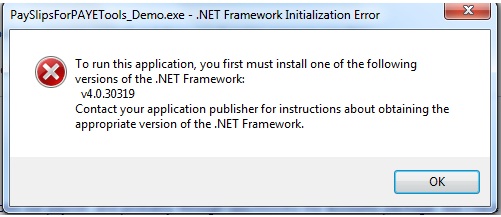
Error:
PaySlipsForPAYTools_Demo.exe – .NET Framework Initialization Error
To run this application, you first must install one of the following versions of the .NET Framework:
v4.0.30319
Contact your application publisher for instructions about obtaining the appropriate version of the .NET Framework.
Trouble installing a .NET framework
Hi there Justin Weebb,
I saw the screenshot of the issue you are encountering. Maybe you are getting this problem due to a wrong installation of .NET Framework 4. Please check if .NET Framework 4 is installed on your computer. To do this:
Navigate to the Windows installation folder and then click on Microsoft .NET folder. And then search for version 4.0.30319. Or you can also click the Start menu and then type %systemroot%Microsoft.NET. Press the Enter key.
1. If you are unable to locate the .NET folder, this means it is not installed on your computer so you need to download it manually and install on your computer.
Download NET Framework 4
2. If you can find v4.0.30319 folder then you need to ensure if it's properly installed on your computer. Run the .NET Framework verification tool from Microsoft to ensure that .NET Framework is installed correctly,.
Trouble installing a .NET framework
Hello Justin,
The application that you're trying to install requires that you have .NET Framework be installed on your computer for it to install successfully and work properly but it seems that you do not have the .NET Framework on your computer yet. If you have it may be an old version that needs to be updated. Do the following:
-
On your computer click Start, and then click Control Panel.
-
In the control panel click on Security Center, and then click on Windows Update.
-
Make sure that you have internet access on your computer and then click on "Check for Updates".
-
The updater will check for updates online and install them, and .NET Framework will be part of those updates.
Hope this helps.
Regards,
Carl
Trouble installing a .NET framework
I assume you are trying to download UK Payslips with HMRC Basic PAYE Tools software. And you are getting this error because you don’t have the necessary requirements to be able to install this software.
This software requires MS .NET Framework version 4 Client. Actually, .NET Framework is automatically downloaded when you install this on your computer. But since you are getting this error, you have to download and install .NET Framework manually.
















