Asked By
paulartney
1290 points
N/A
Posted on - 07/30/2011

Hi guys, I am posting here an issue about Adobe Acrobat/Reader, while I was reading a manual on a PDF file format, I meet an error message it tells me that there is a problem with Adobe Acrobat/Reader, if it is running, please exit and try again.
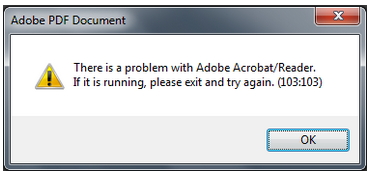
Adobe PDF Document
There is a problem with Adobe Acrobat/Reader.
If it is running, please exit and try again. (103:103)
As I read the above error message, I have a problem analyzing on what went wrong, since it did state any reason for the error, what I did is just to restart my computer in hope to get rid of the error, but same error exist when I am on the middle of my reading,
Please help me with this issue,
Thanks.
How to fix Adobe Acrobat/Reader Error 103:103
Problem.
There is a problem with Adobe Acrobat/Reader.
-
If it is running, please exit and try again. (103:103)
-
You encounter above error when trying to view/read PDF file in web browser.
Adobe Acrobat Reader Pro: As a solution on that, you may do the following.
-
Open your Adobe Acrobat
-
Go to Edit tab
-
Choose Preferences (dialog box appears)
-
Then Documents and uncheck Allow documents to hide the menu bar, toolbars and window controls.

-
And make sure you in web browser option, display PDF browser is checked.
-
To check: As seen above, go to Internet .
-
Adobe Reader X: you may do the following. Open Adobe Reader X / Edit / Preferences / General / Uncheck the option Enable Protection Mode at Start up/ Click OK. Close the program.
-
But: If problem continuously encounter, you may reinstall Acrobat reader or update your software by installing the latest version.
-
Visit this link. http://get.adobe.com/reader/otherversions/
Answered By
Crusso
0 points
N/A
#122662
How to fix Adobe Acrobat/Reader Error 103:103
Some steps can be taken :
-
If this adobe reader is in desktop, then open it , find out the option saying "Always open with protected mode disabled" and check it , then go back to your embedded document in IE and open it.If its not working well , open IE, go to Tools >internet options > advanced tab > click reset. Hopefully that will work soon
-
In case of reading a PDF document in the browser (say in Firefox) by using reader X plug-in, there could be happen the same problem. Exit the browser and restart it but will not be permanently fixed. This can be happening periodically, to avoid the annoyance simply download the PDF document and have it nicely on a desktop.
How to fix Adobe Acrobat/Reader Error 103:103
It seems that the error “There is a problem with Adobe Acrobat/Reader. If it is running, please exit and try again. (103:103)” not only happens with one particular web browser but with different web browsers that are capable of opening PDF files using any versions of Adobe Reader. There are many users complaining about this problem with Adobe Reader when opening PDF files with Mozilla Firefox and or Windows Internet Explorer. Unfortunately, this problem is not caused by the web browsers but by Adobe Reader itself. It is triggered by a particular setting in the program that only needs to be disabled.
But disabling the setting doesn’t guarantee that the problem is already fixed and may vary depending on the status of the problem. Here’s how you can solve this error. This applies to either Adobe Reader X or XI.
-
Open Adobe Reader then go to Edit, Preferences, and then select General in the list of Categories.
-
Find and uncheck the option “Enable Protected Mode at startup” and then click Yes on the dialog box that asks if you want to continue.
-
Click OK then restart Adobe Reader by closing it and then opening it again.
In Adobe Reader XI, the option “Enable Protected Mode at startup” is located in Security (Enhanced) category. If this procedure still doesn’t work, you may try uninstalling Adobe Reader and then installing the latest version if you are still using an older one.
How to fix Adobe Acrobat/Reader Error 103:103
Hi,
Your question was quiet bit interesting to solve. After a while searching for the solution. Your problem was so simple for me. I suggest that uninstall your application then upgrade it first for latest edition of your application. Then it will help you with your problem. But download only the application compatible with your system.
Or ask first if your application was compatible with your system before you download it. Try adobe 9.4 upgrade. Because this one was latest edition of your system. if there’s nothing happened of my solution contact your administrative support for further information about your issue or your problem.
Thanks,
Answered By
TERRY U
5 points
N/A
#122666
How to fix Adobe Acrobat/Reader Error 103:103
In order to fix this.
Option A:
You have to launch the program at its original source or place where it is installed and NOT via Intranet. And do the following:
1- Start / Launch adobe Reader.
2- From the menu, choose Edit > preferences > General.
3- Uncheck the option for "Enable Protected Mode at startup".
4- Re-Start the Adobe Reader.
Refer FIG:

Option B:
1- Uninstall Adobe Reader X and Install Adobe Reader 9 or latest version.
















