Asked By
noel leal
10 points
N/A
Posted on - 04/26/2012

I’m a student and studying SolidWorks at the Pitt State University. I’ve got 2011 Student edition software. When I try to start with my SolidWorks, it asks me to register for the software as the trial version has already been expired. Regardless of this, when I tried to uninstall SolidWorks by couple of attempts, it resulted in the same error message stated above. Could anyone please help me about this?
Error:
SolidWorks Standard …
Could not initiate the transaction (66,
iActTransactionStartFlxActivateApp()/flxActAppActivationReqCreate()
errored [8, 41013,0]).
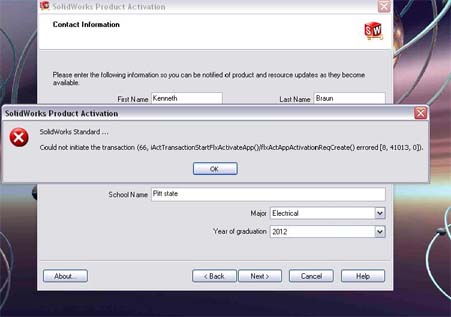
SolidWorks is not running in my pc
Hi'
This type of problem may occur for available internet connection in your computer. When you connected the internet connection in your computer, the registration pop up window for that software came from the server of that software provider.
So you need to purchase the product key for that software. If you want to use trial version for that software then you should delete the cookie for that software from your computer and then try to install it in your computer again. You may use Time Stopper software too for use any trial version software for lifetime.
It will freeze your desktop time and then you can use any trail version software for unlimited time.
Thanks
SolidWorks is not running in my pc
Hi,
That’s a critical problem for you to uninstall that program in your computer. You need to uninstall your previous software for use install trial version again. Here following the steps to uninstall solidworks software from your computer:
-
At first click go the directory where you installed your software and then search the folder which created in install period.
-
Then delete that folder.
-
Now click on the Start button which is located at the bottom screen of your computer’s monitor.
-
Then select control panel, you will get a new window, then click on add or remove program
-
Now uninstall your solidworks software from there.
Hope it will work.
Thanks















