

Setting audio device automatically in Lync 2010
Asked By
10 points
N/A
Posted on - 06/16/2012

Is there a way to set Lync 2010 audio device to automatically switch from speaker to headset when in a call?

Is there a way to set Lync 2010 audio device to automatically switch from speaker to headset when in a call?

There is a way to do that.
Hi,
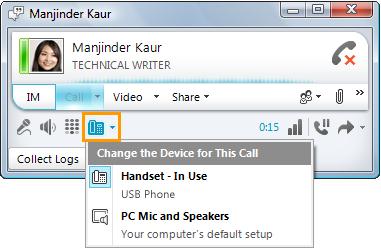
It is very easy you just have to Open Lync, and also, in the lower-left part of the Lync primary window, click on the sound recording gadget menu, after which it select the sound recording gadget you wish to make use of for your Lync phone calls.
In the chat windows, click on the sound recording gadget menu, preceding your participant checklist, after which it select the sound recording gadget you wish to make use of the contact.
I hope you do that.











