Asked By
jayson mars
90 points
N/A
Posted on - 04/07/2012

Dear friends
Am i able to remove the Google search bar on the top right corner of Safari. Its annoying me. Can i customize the things in toolbar similarly as we do things in other browsers?
Help would be appreciated.
thanks
Removing the Google Search bar on the top right corner of Safari
Jayson Mars
You can easily remove Google search box from your safari browser and also can customize your toolbar.
You need interface builder like Xcode, which you can download from below given link
https://developer.apple.com/xcode/
After installing this program follow the below given instructions to remove the search box.
Open your application box and select safari
Right click on safari and select show packages contents
Go to contents/resources/English. proj and then select toolbaritem.nib
Make a copy of above file for back up.
Now open it, I file as shown below will open
Select Google search box and press delete to delete it
Here you can also change location of other items of tool bar but be careful while doing this.
Save the file and close it, now your Google search box will not appear in safari.
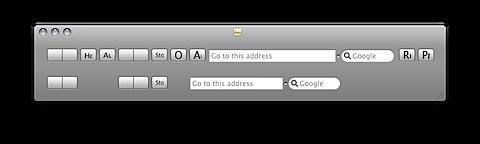
I hope it will solve your issue
Removing the Google Search bar on the top right corner of Safari
Hello Jayson,
It is possible for you to remove the Google search bar in your Safari browser. The following is the procedure that you will need to use:
-
First, you will need to launch Safari by double-clicking the Safari icon in your "Applications" folder.
-
After that, you will need to look for the Google search bar in the top right corner of the Safari browser.
-
Once you have done that, you will need to click the arrow on the left side of the search bar and then choose "Clear Recent Searches."
-
The Google search bar will now be cleared after that.
Hope this helps.
Regards,
Carl
















