Asked By
Jason Wood
10 points
N/A
Posted on - 07/02/2011

Hello,
I want to change anti-virus and so I try for several times to remove Kaspersky expired, except that nothing works when I click again on the Add / Remove programs screen becomes lighter and is written: Do not answer. I despair, what are the possible solutions without damage because I am not using anti-virus for 2 days?
Thank you in advance.
Answered By
emilou
0 points
N/A
#79609
Remove Expired Kaspersky Anti Virus
Hi!
You can uninstall Kaspersky antivirus program by using its Setup Wizard.
-
Click Start, Click All programs and find the Kaspersky antivirus program.
-
Select Remove in the open dialog window of the Setup Window.
-
Uninstall Kaspersky antivirus program.
-
In the Confirm window confirm or cancel the application uninstall. Click Remove. Wait till program files and registry keys are removed.
-
PC should be restarted after removal of Kaspersky antivirus program to finish the uninstall process correctly.
If this still won’t help you can use a tool called Best uninstall Tool that you can use to remove Kaspersky antivirus completely, this tool can be downloaded for free.
Hope this will help!
Answered By
amila a
0 points
N/A
#79610
Remove Expired Kaspersky Anti Virus
Hi Jason,
Try these steps to resolve the issue.
1. Reinstall or repair existing Kaspersky version and then try to uninstall.
2. Download and use Kaspersky removal tool from Kaspersky official web site and try to remove. Follow this link to download Kaspersky removal tool. https://support.kaspersky.com/common/service.aspx?el=1464
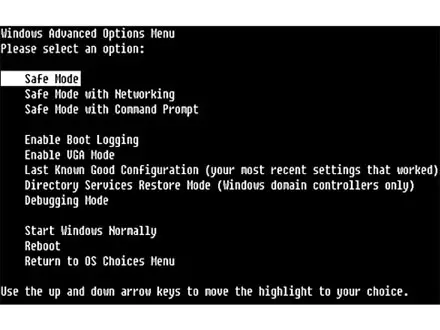
3. Uninstall in “safe mode”. (How to login safe mode? Reboot your PC. Before starting windows press F8 key. Then select safe mode and press enter to login in safe mode, Refer image below.)
4. Use a software tool to uninstall program such as “perfect uninstaller”.
http://download.cnet.com/Uninstall-Tool/3000-2096_4-10662647.html
5. Clean your registry and check your PC for any registry errors and fix them. Try uninstalling now. Use ccleaner to test your PC. Download from this link http://www.piriform.com/ccleaner/download
Hope these will rectify the issue.
Thanks.
Remove Expired Kaspersky Anti Virus
For remove antivirus you:
-
Click on the Kaspersky icon on the system tray
-
right click on icon and click on exit.
-
Go to start panel
-
Click on All Programs
-
Click on Kaspersky Antivirus
-
Click on repair or remove
-
Click on remove icon on the setup window.
-
Click on complete uninstall in setup window.
-
Click on next.
-
Click on remove.
-
Wait until the application files and registry keys are removed.
-
After uninstall a window appear on screen which is asked for restart computer click on yes.
After restart computer your problem will solve.
















