Asked By
HOWARDddACA
0 points
N/A
Posted on - 09/22/2011

Its been about 3weeks since I have been using x4 and today I got the below error.
I don't know what was the cause of this error. I have a windows 7 running very great, but the error came you.
Provide some good advice on how I'll resolve this issue.
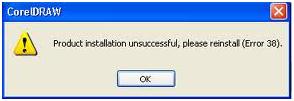
CorelDRAW
Product installation unsuccessful, please reinstall (Error 38).
OK
Answered By
Deanna
5 points
N/A
#127662
Product installation unsuccessful, please reinstall (Error 38).
This error comes because the “Protexis Licensing V2" services in Windows was disable.
For solving this error you can do this:
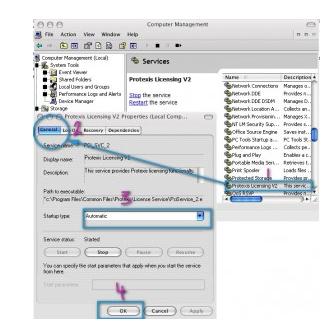
Click Start, then point to Run and type: services.msc at the box find “Protexis Licensing V2”, then start the service. After that change it to Automatic Close the Services window, then restart your computer. That's all, now you won't see that error anymore.
But If you can't find the “Protexis Licensing V2" service, you can download from here:
Copy PSIKey_2.dll and the PsiService_2.exe, and paste them to C:Program FilesCommon FilesProtexisLicense Service
Right click on file REG_Protexis_licensing_service_V2_fix[2010]-ihecker.reg, then choose Merge
After the service installed, edit the service from Computer Management, then restart your computer.
Product installation unsuccessful, please reinstall (Error 38).
You are like others that were already using Corel Draw for several weeks or even months and then suddenly an error like this would appear. There is actually no problem in the installation of the product. Even if you decide on reinstalling it several times it will still be useless because there is really no problem in the installation.
The problem has something to do with the configuration of the program and since you cannot start the program because the error would always appear, there is no way of fixing it from within the product. You need to reset the software to its default factory settings. To do this, press and hold F8 while opening Corel Draw X4 and then restore it to factory default.
If this doesn’t work, you need to check if Protexis Licensing V2 service is running. This error is sometimes the result when you disable this service. To restore this service, click Start, Control Panel, Performance and Maintenance, Administrative Tools then double-click Services. Find Protexis Licensing V2 and then double-click it.
In “Startup type”, select Automatic. Click Start, Apply, then OK to close the window. See image.
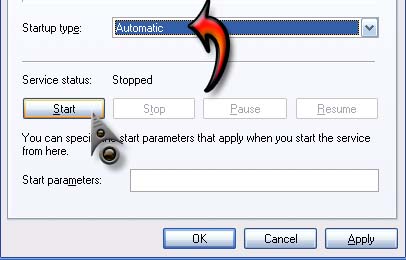
Restart your computer and you’re all set. If you can’t find the Protexis Licensing V2 service, download and install the service from Protexis Licensing V2 fix.
















