
No of visitors who read this post: 220
Type: Question
No votes yet

Hi friends,

I have recently installed the game "attack on pearl harbor" on my system. The problem is that I want to view some of the bit map files (.bmf). Someone suggested me to use XnView to view my bmf directories. I installed the software successfully but when I wanted to open the file with this software, an error popped up on the screen. The screenshot of the error is as follows:
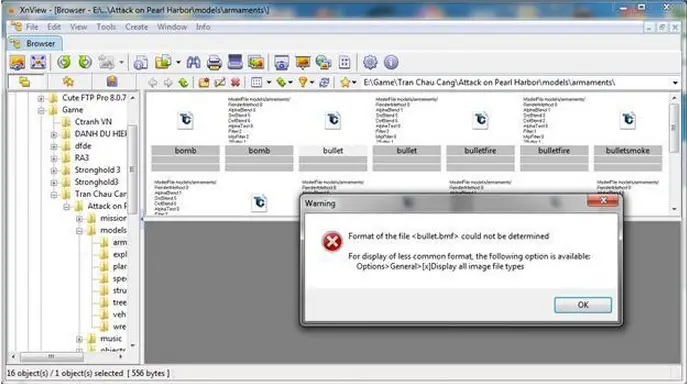
Warning

Warning

Format of the <bullet.bmf> could not determined

For display of common format ,the following option is available

   Options>General>[x]Display all image file types

                                                                          OK
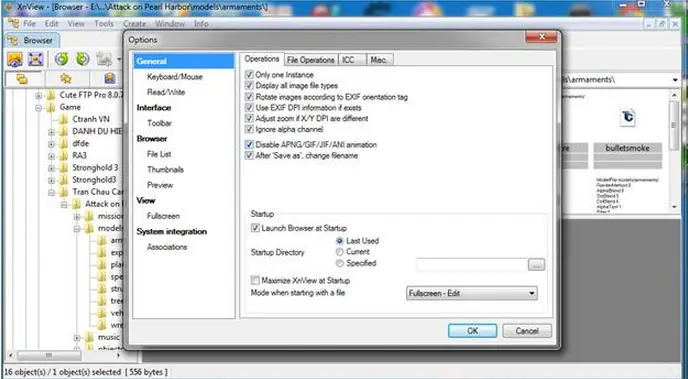
Xnview - options - general

I have tried to settle this down by changing different settings but still the error appears.

Can anyone tell me please why this error is coming up. Where am I making a mistake?

Your help is required in solving the issue.

Looking forward to your views

Kind regards

Judy

Comment viewing options

Select your preferred way to display the comments and click "Save settings" to activate your changes.

#

The problem here is about wrong entry in your registry. You will experience this problem in older version. But I think it is already fixed in xnview  1.93.6.  So re-installing the problem with the same version will not fix the problem. If you are going to re-install, it is better to use the new version. If you still want to use the old version and want to fix the problem, here is the solution.  

Go to this registry.

HKEY_CLASSES_ROOT\Applications\xnview.exe\shell\open\command
"C:\Program Files\XnView\xnview.exe" -slide "%1"

Delete the “slide” word. The correct is this one

HKEY_CLASSES_ROOT\Applications\xnview.exe\shell\open\command
"C:\Program Files\XnView\xnview.exe" "%1"

Note: Just keep your program path. Don’t change it.

Good luck.










