
Hello ,
When i try to install Panda Antivirus and Panda Internet Security, i got the following error image and message .
How can i solve this ?
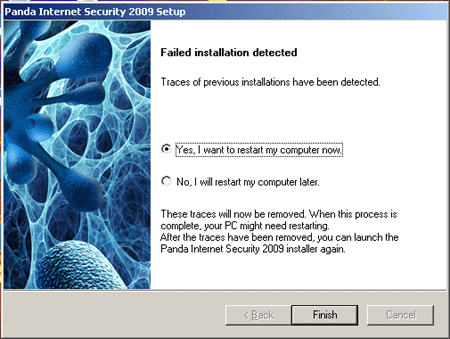
Error message :
Failed installation detected. Traces of previous installations have been detected
Yes I want to restart my computer now
No I will restart my computer later.
These traces will now be removed. When this process is complete, your PC might need restarting. After the traces have been removed, you can launch the Panda Internet Security 2009 installer again.
Finish
Panda Internet Security installation failed
Hi,
Do the following and get rid of the problem:
Search your computer for the file c:windowsRAVTC.tmp and delete it if it exists.
Now reset the Winsock catalog by following direction:
-
Click Start and Run
-
Type CMD and press Enter
-
Type 'netsh winsock reset catalog' and press Enter
-
Type Exit and press Enter
-
Restart your computer.
Now again install panda software. This time it should be ok.
Hathy
Panda Internet Security installation failed
Hello Susan,
The following procedure should help you resolve the error you are getting during the installation of Panda Antivirus and Panda Internet Security:
-
First you will need to download the PandaSecurityUtility and then save it to your desktop
-
After that you will double-click on it in order to run it.
-
In case your operating system is Windows Vista or Windows 7 users, you will have to right-click on the file and then click Run as Administrator so that the program has the correct permissions to uninstall the software.
-
After the utility has finished, you will need to search the computer for the following file C:WindowsRAVTC.tmp and then get rid of it.
-
You will then reset the Winsock catalog by doing the following:
Regards,
Carl
















