

OS does not meet the minimum requirements for Roxio
Asked By
20 points
N/A
Posted on - 08/29/2012

Dear Friends,
I have been using Windows 7 Professional. I recently purchased Roxio easy VHS DVD. The installation was proceeding fine and went till nearly 75% when I got the below mentioned error. Strange behavior as it shows a false compatibility issue.
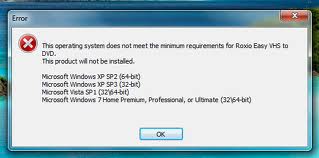
This operating system does not meet the minimum requirements for Roxio Easy VHS DVD.
This product will not be installed.
Microsoft Windows XP SP2 (64-bit)
Microsoft Windows XP SP3 (32-bit)
Microsoft Vista SP1 (3264-bit)
Microsoft Windows 7 Home Premium, Professional, or Ultimate (3264-bit)
Microsoft Windows XP SP2 (64-bit)
Microsoft Windows XP SP3 (32-bit)
Microsoft Vista SP1 (3264-bit)
Microsoft Windows 7 Home Premium, Professional, or Ultimate (3264-bit)
Any thoughts?













