

MS PowerPoint system error recovery
Asked By
190 points
N/A
Posted on - 06/26/2012

When I work on MS PowerPoint while working with any file or document it shows MS PowerPoint has corrupted.
How can I recover this problem?

When I work on MS PowerPoint while working with any file or document it shows MS PowerPoint has corrupted.
How can I recover this problem?

When this problem occurs, It is so frustrating as the computer freezes suddenly when the work is almost done. But you don’t worry; MS PowerPoint keeps your work by the feature named Auto Recovery Feature. It keeps temporary copy of works which crushed.
Your job is done
I’m confused if the problem is with Microsoft Office PowerPoint itself or with the file you are opening. If the problem is with Microsoft Office PowerPoint where it crashes and doesn’t start, try restarting your computer and then open Microsoft Office PowerPoint again. It could be a problem with other applications that are simultaneously running together with the program.
Make sure no other program is running besides Microsoft Office PowerPoint for proper troubleshooting. If this doesn’t fix the problem, try reinstalling the application. If Microsoft Office PowerPoint is part of the Microsoft Office suite, you need to uninstall only this application and not the entire Microsoft Office package. To remove it, click Start, Control Panel then Add or Remove Programs.
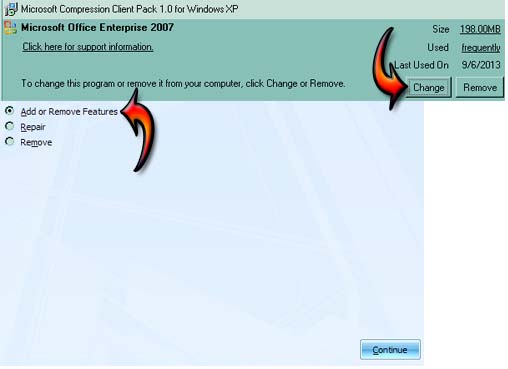
Scroll down to Microsoft Office then click Change, select “Add or Remove Features”, and then click Continue. See image.
On the next screen, select Microsoft Office PowerPoint, click on the pull-down menu before it, select Not Available, and then click Continue. This will uninstall Microsoft Office PowerPoint from your computer. See image.
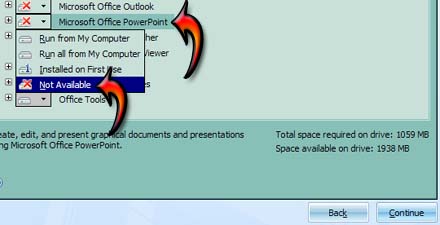
Follow the succeeding instructions and then wait for it to finish. Restart your computer if it asks you to restart the system. Once removed, follow the same procedure to reinstall Microsoft Office PowerPoint. When you reach the point described in the second image, select either “Run from My Computer” or “Run all from My Computer”.
In case the problem is not with Microsoft Office PowerPoint but with the file you are opening, please refer to Fix Corrupted Files.












