Asked By
looner
40 points
N/A
Posted on - 07/05/2011

Greetings my friends I have been searching for this error solution all over the internet but still got no answers to it so now I am asking you fellows to answer this question so I can get this done and can move forward with my work.
Now the main issue is that I was installing an upgrade of chrome where I received this error that Firefox cannot install this item because chrome registration failed.
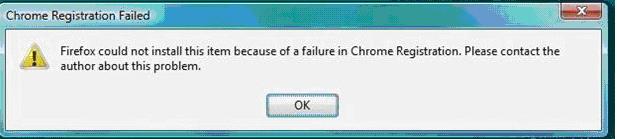
Firefox could not install this item because of a failure in Chrome Registration. Please contact the author about this problem.
Now I don’t understand that why is that so why does Firefox not accept this update?
Is this update un-registered?
I don’t think that updates need to be registered they are just packages to be installed.
Now all I need is that someone out of you friends help me out and tell me how to make it registered or get rid of this error without registration.
Answered By
NickS
0 points
N/A
#121889
Mozilla Firefox Registration Failure Error
Hi there,
In your post you did not mention what operating system you are using in the pc you are trying to update Google chrome. But it seems that you are using either Windows Vista or Windows Seven with “User Access Control” turned on. The “User Access Control” or better known as UAC restricts which software can make changes to your operating system or system files which include administrative right.
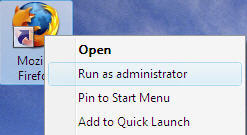
Since Firefox does not have the administrative right to make changes to your PC it is giving the error you are encountering. So to solve this problem, just right-click a Firefox shortcut and choose Run as administrator. Your Firefox should now start with administrative rights and your chrome installation should proceed smoothly.
Good Luck!
Answered By
points
N/A
#121890
Mozilla Firefox Registration Failure Error
Hello,
This problem might also for add-ons. There are many add-ons that looks like good but they are the mostly condemned for trouble.
-
Go to Firefox menu >> Add-ons >> Extensions tab
-
Find out any extension that you didn’t install by yourself.
-
Remove the extension.
-
If needed, restart your Firefoxx
If that doesn’t work,
-
From the Firefox menu, go to Help >> Restart with Add-ons Disabled…
-
Confirm the function.
Let’s see if your problem can still stay in your Firefox.
Mozilla Firefox Registration Failure Error
That’s indeed a very odd error. If you are upgrading Google Chrome to the latest, try downloading the offline installer. Download the free version of Revo Uninstaller and install it. Once installed, start Revo Uninstaller then select your Google Chrome among the applications and click “Uninstall”. Follow the normal uninstall process.
When uninstall is complete, click “Scan” to scan your computer for any leftover files and delete everything it finds. This removes everything the program created on your computer. When it is finished, close Revo Uninstaller then download the latest Google Chrome web browser. This is the standalone installer. This should fix the problem. If you want to upgrade Firefox, download the latest Mozilla Firefox web browser.
This downloads the web installer for Firefox. If you want the standalone installer, click the “Advanced install options & other platforms” link on the page. The next page provides the standalone installer for different operating systems. Both web browsers support Windows 7, Windows 8.x, and Windows 10. They dropped support for Windows XP and Windows Vista.
















