I am using Microsoft Office for my studies and researches. I am currently using 2003 version but since the documents now in ms-word won't open on ms-office 2007 because they have different extensions, I decided to upgrade my office.
But after installing MS Office 2007 and open a document, an error at the bottom of MS-Word 2007 stating "This modification is not allowed because the selection is locked." I opened a file but it cannot be edited.
And when I try to paste something on my doc there is an error that says,
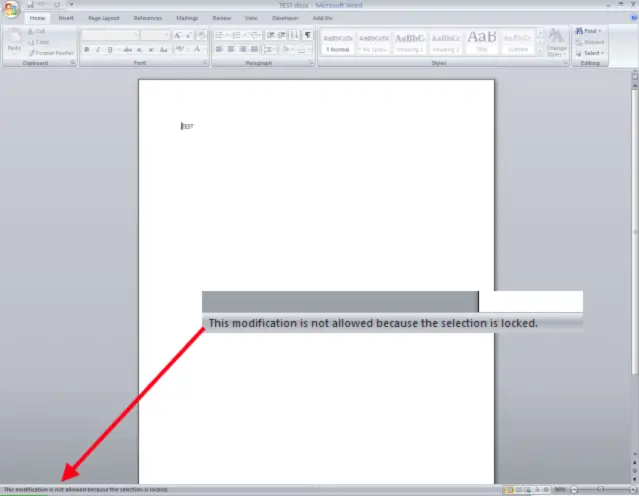
What does this errors means?I clicked the icon Protect Document under the review tab on MS Word and uncheck the Restricted Access tab, but it doesn't change anything.
My computer runs a windows vista home premium service pack 1 with core 2 duo, 32-bit OS. The installation disk I used for installing MS Office 2007 automatically insert the product key upon installing. So I am not quite sure if this is legit or not.
Is there a possible way to fix this problem?
Please help because I already erase the ms-office 2003 from my pc to be able to continue installing 2007.
Upgrading MS-Office to 2007 results errors
Hello,
I will try my best to help you out. When a document marked final, the typing, editing features of the document are disabled and it becomes a read-only document. Follow the below steps to edit a document marked as final:
-
Open the document.
-
Click the Office Button on the top left corner of the document.
-
Choose the “Prepare” option.
-
Click “Mark as Final”.
If the issue is not resolved, the following can be the other possible reasons. From the information that you have provided, it is not clear whether you are using the trial or full version of Office 2007.
If you are using the trial version of Office 2007, it might have expired. You can either uninstall the trial version or purchase a full version product key if you would like to continue using the product. To open a Office 2007 or later word format (e.g., .docx or .docm) using Office 2003, please install the Microsoft Office Compatibility pack which is available for free download from the following web link
However, you will not be able to open Word template formats like .dotx or .dotm formats by installing the Compatibility Pack. If you are using the full version of Office 2007:
It might not be activated. If you have not activated your copy of Office 2007, it will move to the reduced functionality mode. In this mode Office 2007 will work only as a viewer. You will not be able to create or edit a document. Please follow the steps provided below to check or activate your copy of Office 2007:
-
Open Word 2007.
-
Click the Microsoft Office Button on the top left corner.
-
Click “Word Options” from the menu. Choose ‘Resources” option, and then click “Activate” button after the “Activate Microsoft Office” option.
If Office 2007 is already activated, you will receive the message “This product has already been activated. ” Else follow the activation wizard.
You may visit the following web link for more information on Office 2007 activation:
Restrict Permission. It disables the permission for unauthorized people to edit, copy or print the particular document. Please follow the steps provided below to stop protection:
-
Open the particular document.
-
Click the “review” tab.
-
Choose “Restrict Formatting and Editing” option from the drop-down menu.
-
Select the “Stop protection” option.
You may be prompted to enter the password provided by the authorized person.
Please visit the following web link for more information:
You can also try following the steps below to stop the protection:
-
Open the document.
-
Click the Office button and choose the “Save as” option.
-
Choose “Word XML Document” from the “Save as type” drop-down menu.
-
Save the document and close Word.
-
Go to the location where you have saved the XML Document and open it using Notepad.
Note: To open the file using Notepad, right click the XML Document and select “Open with” option. Then choose Notepad from the list of programs.
-
The Notepad file opens. Click the “Edit” tab and select “Find”.
-
Type “MarkAsFinal” (without quotes and space) in the find box and click “Find”.
-
Just delete the word “TRUE” after “MarkAsFinal” and save the Notepad.
-
Open the XML Document with Word and click “OK” in the dialog box.
-
Click “Yes” in the next dialog box.
Hope the information provided is helpful in solving the issue.
Thank you,
Ganga
Upgrading MS-Office to 2007 results errors
Wow! That’s a whole lot of solution. It is totally wrapped in a complete package. All I can say is Thank you very much for sending me detailed instruction.
Problem solved already.
Thanks to you.