

Manual malware hunt using FreeFixer
Asked By
10 points
N/A
Posted on - 06/14/2012

I’ve got the news of the release of FreeFixer, which can help to go on a manual malware hunt.
Are critical windows system are included in the report?

I’ve got the news of the release of FreeFixer, which can help to go on a manual malware hunt.
Are critical windows system are included in the report?
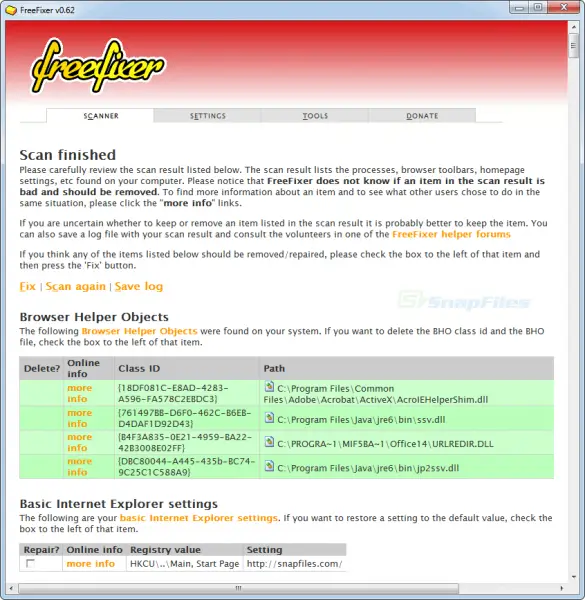
Free Fixer features and System Requirements,
This tools use to determine if your files were safe or malicious and it is free from risk, all of your important and critical system files will be intact and unchanged. This software performance is similar to hijack this software but the advantage of Free Fixer is that it reveals its neat feature and the rest of the option. And its functionality is to scan all critical areas of your windows where spyware and malware often executed itself.
Free Fixer can run in any of the following Operating System,
Free fixer can run only on 32 bit operating system aside with this are not supported. and it only need 1.6 MB free space of the harddisk since Free fixer is only 800 kb in size, and no reboot needed in order to use after installation.
Below are the Free Fixer Vital Role,
All scan files colored as green are those declared as safe files and anything that are not highlighted will be check. In addition Free Fixer is very useful and handy to manage basically remove all malicious spyware and malware infection and it is recommended to use as it is safe and Free.

After learning a short info about FreeFixer, I’m not sure if you can really use it to remove viruses from your computer. First of all, after doing a scan on your computer, FreeFixer doesn’t have any idea regarding the files it scanned. Though the result of the scan will show some files on the computer that are known to the program indicated by the green color, there are ones that are unknown to the program indicated by the white/gray color.
You can ignore the ones that are in green color but the files in white/gray are your main concern. Since FreeFixer does not know what is an unwanted file or which file is infected, it is up to you to decide whether the file needs to go or should remain on your computer. This is very risky because it can damage your system in case you accidentally deleted a wrong and healthy file.
I’m not sure if it’ll help you remove malware from your computer. Though you can check its website for the file’s information, it is still added work and I’m not sure if it will do much good if there are too many white/gray files. If you still want to use FreeFixer, visit FreeFixer Free Download.












