
I cannot connect to the iTunes Store because of the error I get "ITunes store connectivity problem, error code: we could not complete your iTunes request. An unknown error occurred (0x800b0101)". I am trying to go to iTunes to activate the iPhone 4 that I have. Thank you.
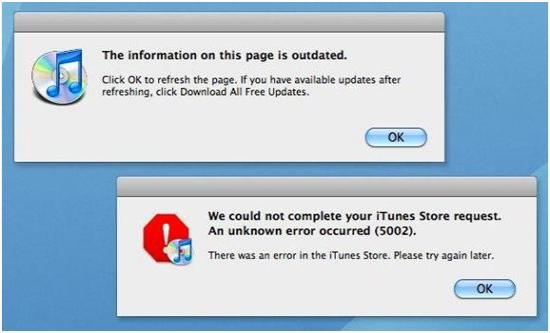
Error:
The information on this page is outdated.
Click OK to refresh the page.If you have available updates after refreshing,click Download All Free Updates.
ITunes store connectivity problem, error code (0x800b0101)
You need to go through these steps to solve the problem. First of all check your Date and time. To correct date and time in windows, go control panel, then click “Date, Time, Language, and Regional Options”. After that select date and time. Now correct the date and time. In Mac go apple menu, choose system preference. Then click date & time. Enable “set date and time automatically”. Check the time zone is correct. Now adjust your certificate setting. In Mac choose utilities from go menu. Open Keychain Access. Choose preference. Hit on the Certificates tab. Select Off under both “Online Certificate Status Protocol (OCSP)” and “Certificate Revocation List (CRL)”. Restart your Mac.
ITunes store connectivity problem, error code (0x800b0101)
Hello Trish,
To resolve the issue you are getting when you try to connect to iTunes, you will need to use the following workarounds:
-
You will need to check the version of iTunes you are using. If it is an older version you will need to update it because such an error can be occur when you are using an outdate version of iTunes. See is that resolves the issue. If it does not, you can try the next workaround.
-
On your computer, you will need to check the date and time settings and ensure that they have been configured correctly. They may be a conflict in time settings on the computer which are causing the error to occur.
Hope this helps.
Regards,
Carl
ITunes store connectivity problem, error code (0x800b0101)
There are different ways of activating your iPhone 4 either using a SIM card or without using a SIM card and also remember that iPhone 4 uses a miniSIM card. But whichever methods you choose, the steps still uses iTunes in activating the Smartphone. That’s why I am having a doubt that your problem is not with your computer’s internet connection but with the installed version of iTunes because the error you are receiving points to somewhat outdated information in iTunes. Before starting the procedure, make sure first that your computer has an active internet connection.
Open any of your web browsers then see if you can visit some websites in it. If you are successful then there’s no connection problem.
-
Download and install the latest version of iTunes from Apple | iTunes | Download iTunes. I think you are getting that error because of an outdated program.
-
Connect your phone to your computer using the USB cable and then follow the on-screen instructions. Make some necessary backups at this point.
-
Activate your iPhone 4 either by visiting AT&T | Activate Your Phone or by calling the number “1-866-895-1099” using another phone.
-
Start your phone and then make a test call. And you’re done.
After making your first call, you should setup your visual voice mail by tapping on the green phone icon, selecting the voice mail icon and then choose Set Up.
















