
Hi experts,
You know that Internet gives a huge option to the information or data age.
Nowadays, access to data has turn out to be a matter of status. It is better when you are quicker.
The start of new links like ADSL, broadband, satellite or fiber optics has significantly transformed the mood of connecting web pages on Internet.
From movie downloads to online games, the Internet has transformed communication as well as sharing the info.
Because of the edge that it provides, it is vital that we all can join Internet without any hassles.
But you could be faced some technical hitches such as:
1. Very Slow Internet connection
2. Authentication troubles
3. Wrong settings of the Modem
4. Browser problems
5. Firewall Problems
6. Dialer-tone Problems
7. Setting up connection.
Error: Error 651
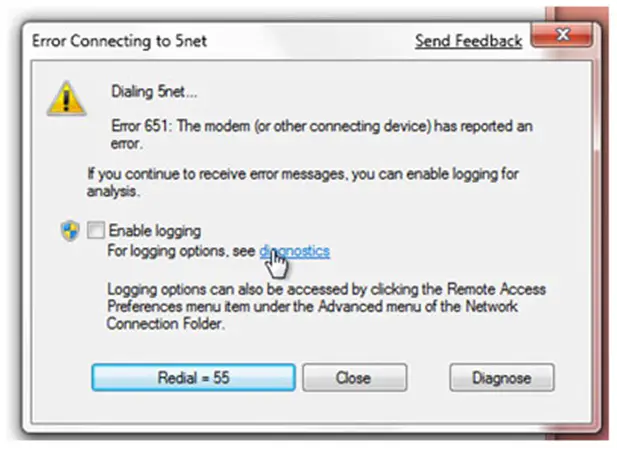
Error Connecting to 5net Send Feedback
Dialing 5net…
Error 651: The modem (or other connecting device) has reported an
error.
If you continue to receive error message, you can enable logging for
analysis.
Enable logging
For logging options, see diagnostics
Logging options can also be accessed by clicking the Remote Access
Preferences menu item under the Advanced menu of the Network
Connection Folder.
Redial = 55 Close Diagnose
But what should we do? Please help.
Thanks a lot.
Answered By
Amy Shum
5 points
N/A
#140900
Internet Connection Problems – Looking for Help
You are right, if there are benefits, there are hell of problems even too. However, a bit of research can get you out of mess. In your case, just disable the Firewall/Security Software and sets it active when you are done. If it doesn't help you anyway, try boot your computer in a Safe Mode with Networking.
Now point to raspppoe.sys file you may find in the directory, Windows/System32/Drivers. Substitute the file format / extension with anything you want to, for instance, raspppoe.old. Now download a fresh and accurate file from https://www.bing.com/?form=MO0035 and save it in said directory. It will help you solve the problem.
Internet Connection Problems – Looking for Help
You encounter this error because there is problem to your modem or any other device connected to your computer. To fix this error please follow these steps.
-
Click My computer, then control panel -> modems
-
Check if modem is installed properly. If it is not installed correctly then you should remove your modem, then restart your computer then install it again.
-
If you still encounter the error, remove dial up adapter and TCP/IP from control panel -> networks then restart your computer then re-install it again.
-
It is much better also to install latest drivers for your modem.
Hope this helped.
Answered By
huma89
10 points
N/A
#140902
Internet Connection Problems – Looking for Help
To fixing the Authentication problem of your modem restart the connection and follow the root path: Menu > settings > Authentication.
Now retype your username and password and press the OK button.
If you want to solve the problem quickly, just uninstall you modem from control panel or all programs tab and then reinstall it after rebooting the system.
Hope the solution might be helpful to fix your problem.
Internet Connection Problems – Looking for Help
The speed of your internet varies with what kind of connection subscription you do have or with your internet connection configuration. Choose high-speed modem/router. Your modem/router should be properly set-up according to its specifications and instructions. Usually, all needed password and instructions in setting-up modem/router were enclosed with its packaging. If your modem/router is configured correctly and still experiencing glitches, move your computer near to router or try to use the ‘PING’ command maybe your network provider supplied you lower internet speed that what you agreed for.
Turn-off first your firewall software before installing your router.Sometimes it blocks your installation that resulting to Firewall Problems. If you cannot connect to a websites, double check your Internet Options on Tools menu.
Using the windows network wizard sometimes makes the best deal of all for beginners. What I mentioned above should be done by someone knowledgeable with networking.
















