
No of visitors who read this post: 174
Category: Anti-Virus
Type: Question
Author: Ace heltsley
No votes yet

Why am I getting the error message on the picture I attached? This happens every time I try to install Avira AntiVir Premium. Possible reasons might be related to windows update but I need help with checking that.
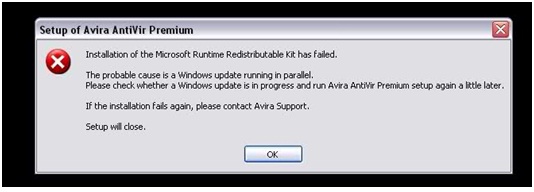


Setup of Avira AntiVir Premium
 
Installation of the Microsoft Runtime Redistributable Kit has failed.
 
The Probable cause is a Windows update running in parallal.
Please check whether a Windows update is in progress and run Avira AntiVir Premium setup again alittle later.
 
If the installation fails again, please contact Avira Support.
Setup will close.
 
                                       OK

Someone please tell me what I should do.

Comment viewing options

Select your preferred way to display the comments and click "Save settings" to activate your changes.

# (Solution Accepted)

Do you have any other applications running on your computer when you are installing Avira, because it looks like there is a conflict between Avira and some application that you are running on your computer? You will need to do the following:

  • Press CTRL+ALT+DEL on your keyboard, and the click on Start Task Manager.
  • After that the task manager window will open.
  • You will need to end the programs that you are running on your computer right now that might be causing the issue. You can go to the processes tab and see if you can end the processes from there.
  • After that reboot the computer and then try reinstalling Avira.

Regards,

Carl

#

Hi ace,

I think there is running any program like Avira in your pc. Please remove the program at first and then try to install Avira antivirus personal again. Thanks.










