Asked By
ebenezer
0 points
N/A
Posted on - 10/04/2011

For those who frequently use computers, of course is not unusual when we oftenforget the time.
Especially when we are busy playing games, or engrossed inbrowsing, often we get many minutes or even hours of fun watching our screens.
how to know how long my computer has been lit, or in other words how long I've been using a computer.
Very handy, especially when I want to know how big his name still addicted to the same computer, to make me forget myself.
How long do we use computers
You can use Norton SystemWorks’ Norton System Doctor to monitor your Windows up time so you can know how long you have been using the computer. You can set Norton System Doctor to start automatically when Windows boots so it can immediately start monitoring the time Windows starts. Norton System Doctor is accessible in Norton SystemWorks’ Monitor System Performance menu.
You can add additional sensors like:
-
Battery Power – monitors the remaining charge in a laptop’s battery.
-
Cache Hits – monitors how much of the data required by applications is found in the disk cache.
-
Cache Memory Utilization – monitors the amount of physical RAM that is used in disk cache.
-
Disk Space – monitors the amount of free disk space in the hard drive.
-
Current Date and Time – displays the current date and time.
-
Commit Memory – monitors Windows page file.
-
CPU Usage – measures the amount of time the CPU spends executing instructions versus the time it spends idle.
-
Disk Optimization – monitors the hard disk’s fragmentation level.
-
Disk Slack Space – monitors the amount of slack space on the disk.
-
Disk SMART Status – this sensor works with drives that have built-in Self-Monitoring, Analysis, and Reporting Technology (SMART).
-
Windows Up Time – shows how much time has elapsed since you last started Windows.
There are still other sensors available. Feel free to try them on your system.
Norton SystemWorks can be downloaded here.
How long do we use computers
One of the easiest way to check how long you have been using the computer is to take note what time you turn on the computer and the moment you finishes using it.
Be aware of the clock from the moment you start using computer and after. Check the time difference and you should be able to know how long you have been setting down.
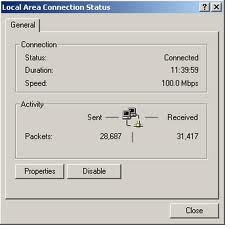
You can also check the computer duration by doing a right click on the little computer monitor icon in the system tray.
Do right click and click on open Network and Sharing Center, look for Change Adapter Settings and right click on Local Area Connection. Double click the icon and the duration should be displayed. This indicate the time usage you've on the computer.