

How to fix ‘waiting for cache’ error while using Chrome?
Asked By
20 points
N/A
Posted on - 08/21/2012

Friends,
Sometimes when I am using Google Chrome, I come cross "waiting for cache" error. How can I fix it?
Please suggest.

Friends,
Sometimes when I am using Google Chrome, I come cross "waiting for cache" error. How can I fix it?
Please suggest.

Hi,
To get rid of the problem what you will have to do:
Open your Google Chrome and at the top right corner click on the wrench icon.
Click on 'Clear browsing data…'
Put a tick mark at the left box of 'Empty the cache' and from the 'Clear data from this period' choose 'Everything'.
Last of all click 'Clear Browsing Data'
Restart your browser.
I think your problem has been solved.
Hathy

Hi Victoria,
This is caused by cache corruption and other would suggest a lot of complicated steps. However clearing the cache will be the fastest way and simplest way to resolve the problem. You can also try to clear temporary files on your computer by typing in %temp% on your Run box. If there are any prompt that files cannot be deleted just ignore it and continue clearing your temporary files.
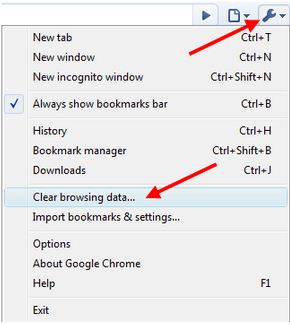
The “waiting for cache” error is a kind of error that normally doesn’t appear on your screen. It can be encountered when you are using the Google Chrome web browser and the error message doesn’t actually appear on the middle of the screen like what normal error messages do. You can see it at the status bar of the browser where the link appears.
When you encounter this error, the page you are opening doesn’t load and you will see the “waiting for cache” message on the status bar but when you try to open the same page on a different web browser the page loads successfully. The problem can happen on any website you are visiting and it seems to be caused by corruption on the browser’s cache.
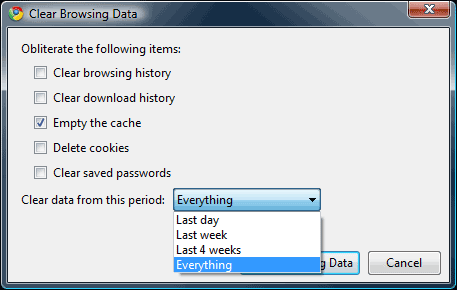
Though I haven’t encountered it yet maybe because I never use Google Chrome, the easiest way to fix it is to clear Google Chrome’s browsing data. Press CTRL + SHIFT + DEL to bring up the “Clear Browsing Data” dialog. Check “Empty the cache” and select “Everything” in “Clear data from this period” and then click “Clear Browsing Data”. That should fix the problem.











