How does disc cleanup work in Windows Vista?
I tried it once and it showed almost 10GB of data to be cleaned. But after completing disc cleanup my drive show only 4GB of the data cleaned.
How does disc clean up works in Windows Vista?
I think your cleanup does not work properly. If you sure that it shows 10 GB to be cleaned then before the confirmation to delete some of the check box are unmarked and so the disk is not properly cleaned.
So follow the prescribed procedure to clean up your drive:
To open Disk Cleanup by clicking on the Start button (left side below), point All Programs, click on Accessories, click on System Tools, then click on Disk Cleanup.
When the Disk Cleanup Options dialog box appears, select the partition of the hard drive which you want to clean up and click OK.
After that select the check boxes for the files you want to delete. (Specially compressed file box)
When you finish with the selecting the files you want to delete from the directory, click OK, and then click on Delete files to confirm the delete process.
When done check back the drive. It will be ok then.
How does disc clean up works in Windows Vista?
Hi!
Disc clean up also compresses the file aside from removing temporary files you are not using. There might be a possibility that there were 10GB of data that was stored on your computer but only 4GB of them are those you won't use anymore. Some of these data files are Temporary Internet files, Windows error reporting files, also those downloaded programs like (A storage location for programs downloaded when you visit specific web sites that use ActiveX and Java applets), and those files you have deleted that are in your recycle bin.
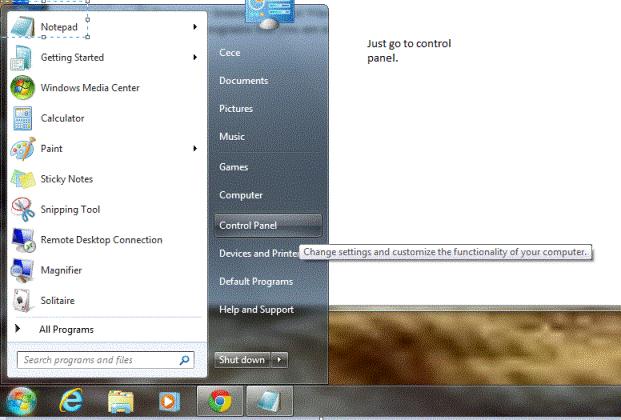
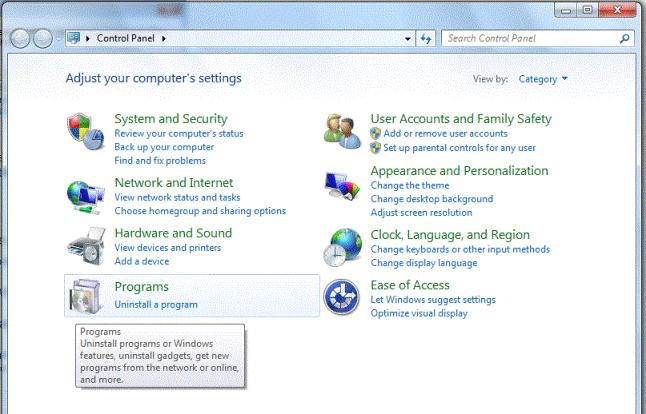
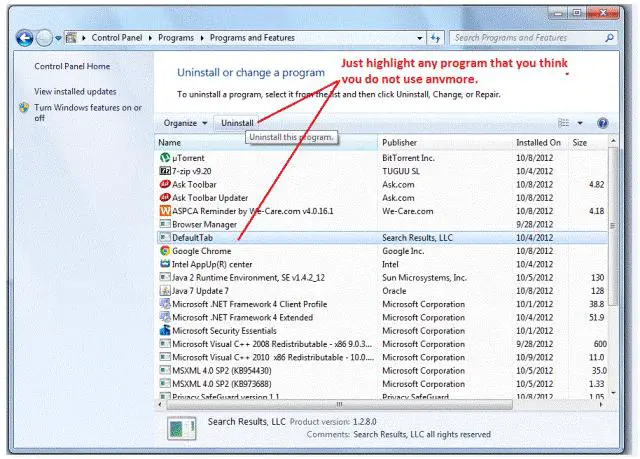
If you are trying to have more space on your computer, you can also try to uninstall programs that you are no longer using. Just a reminder before you go ahead and do disc clean up you may also need to create a restore point on your computer, so if there are files that were deleted during the cleaner you can still open it up with the restore point you created.
Here are the steps for you to uninstall a program:
How does disc clean up works in Windows Vista?
At first, I thought you are referring to a different application that has the same name but it turns out you are referring to Microsoft Windows’ own Disc Cleanup utility. The reason why only 4 GB data was cleaned out of the supposed 10 GB is probably because of the item called “Compress old files”.
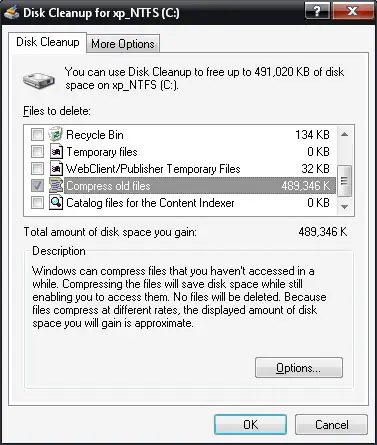
When you start Disc Cleanup, it will scan the selected drive for files that can be cleaned like temporary files. Once it finished scanning, the window will show you the items that can be cleaned and their specific sizes. Each time you check an item, its size adds up to the total size you see next to “Total amount of disk space you gain”.
Normally, the item “Compress old files” is big. Checking this item doesn’t mean it will be removed from the system. This item refers to the old files on your system that you haven’t accessed in a while. It is not a kind of trash or temporary file that should be cleaned or deleted.
When you check this item, it means Disc Cleanup will compress those old files but no files will be deleted and the indicated size will be reduced to a smaller amount. That is probably why the 10 GB data you expected to be cleaned went down to only 4 GB because of the compressed files.