I have a HP brand desktop Computer.
It’s my family Computer. Sometimes my sister see movie using the DVD writer.
Now Its very slow to read any DVD.
So, I want to disabled the DVD writer drive. Only I can access the DVD writer.
Is it possible?
If possible how can I do this?
Answered By
lee hung
75 points
N/A
#122312
How To Disable Slow DVD Player
Hi Wilson,
Try to resolve the issue on fixing your DVD Writer first.
1. Insert blank CD/DVD Cleaner on your DVD drive.
2. Reinstall your software that could play DVD or download to internet.
Example: Windows Media Player, AVQ reader etc.
Steps on how to disable DVD Drives
1. Open your CPU
2. Remove DVD Drive power cord
Steps on how to disable your DVD Drives without opening your CPU
On My Computer
Click Start
Look for My Computer and click it
Go to Local Disk or Drive C:
Right Click and Properties
Go to the Hardware tab (Properties)
Click DVD or CD-ROM drives
Click Properties(bottom right)
Click Drop Down
Disable the device by clicking
Don't use this device or disable
Click okay and close.
TAKE NOTE:
Some slow DVD causes are just dust, especially of your device is quite old enough. It is just a simple cleaning process that can make this problem to be fix.
Some Slow DVD causes are also in your Hardware especially if you have an old pc. It is advisable to upgrade your component that causes this error.
Defective DVD player has a slow read also, and very noisy when it read files. I think this is the reason why you want to remove or disable you DVD drive.
Thanks,
Tony Stevenson
How To Disable Slow DVD Player
May be a fault CD is used on your computer and it is not working fine. Then you can remove it from your computer or you can simply make it ineffective. So if you have a plug and play DVD then you can disable it by simply going to SAFETY REMOVE HARDWARE that is available in task bar and by clicking it a pop up window will appear that will able you to disconnect your DVD drive.
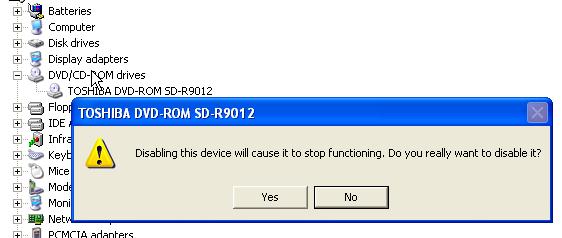
The other way is to go to computer properties and then to device manager her you need to expand the DVD drive and then right click on DVD and click disable then you need to click yes and your DVD will be disabled for now. If you want to enable the DVD you can repeat the same steps then you need to enable it and your problem will be solved. As i shown here: