

How to capture screen shots
Asked By
0 points
N/A
Posted on - 03/30/2012

How to capture screen shots without installing any other application.
I have heard it was built in every windows OS but,
Don't know how to do it.
Please help.

How to capture screen shots without installing any other application.
I have heard it was built in every windows OS but,
Don't know how to do it.
Please help.

Hi Carson Fernandez,
Capturing a screen shot in a window, in your desktop, or just anything in the windows has been pretty simple and easy. You do not have to download or spend anything for an application just to capture screen shots. Just take advantage and utilize the free features in your Windows Operating System.
Just use the paint application in windows. Although it does not directly have a feature to capture screen, you still need it to capture the screen because it is where you load and save the screen shots you have taken. Here is how to do it:
1. Capture the image or screen shot by pressing Print Screen on your keyboard or the key with the name “PrtScn” on it.
2. After capturing a screen shot, you need an application to load the image. You have to open MS Paint. Click Start Button -> Programs -> Accessories -> MS Paint.
3. Click the Select Button.
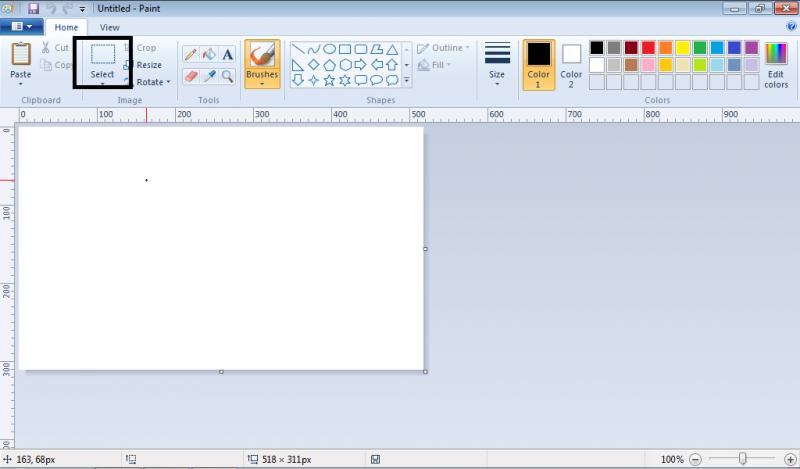
4. Right-Click on the working area or the area where you draw or simply paint.
5. Click Paste.
6. After the image is shown, save it to a type you want.
Mathew Joni
Hi,
The following are the steps to follow when taking screen shot.
Go to the start menu.
On the lower right side you will see search.
Type the word snipping.
You click search.
You will be able to see an icon written snipping tool.
Click on it.
Under new click and then go to where you want to take shoot you.
You will see + sign and drag the mouse to where you want it to be.
After you are done there will be an option to save.
Save using any name that you may be able to recall.
Under new menu you may be able to take.
Free shape snip taken according to the shape that you want.
Rectangular snip.
Full screen snip.












