Asked By
nadiajgoff
30 points
N/A
Posted on - 06/25/2012

I found this error message {to open this workbook your computer must have a version of Microsoft excel installed and your browser must support opening file directly from excel}
How can I resolve error message on office 2010 workbook
The problem is not so complicated.
The solution is
1. Install the Microsoft Excel to your computer by selecting custom menu in the installation process.
2. See the firewall options and allow if the Excel. .exe file is blocked.
3. Open the browser and then click Options. To Privacy to see the blocked and supported file lists that is allowed to be run under the Browser. If not given then you need to assign the supported applications that are itself supported.
As such do not make any wrong instructions to the computer that may affect other programs working normally.
Remember this could be a problem of installation.
How can I resolve error message on office 2010 workbook
With this issue you posted, I guess it is no longer a problem with the availability of Google Docs. With Google Docs, you don’t need to actually install Microsoft Office Excel or any Microsoft Office applications because they are already available on Google. You just need to sign in to your Google account and use the cloud applications instantly. And the best part of it, it is totally free.
All you need is a web browser, an internet connection, and most importantly your Google account or Gmail account. If you have a Google account, start your web browser and go to Google Docs. If you are asked to sign in, it means you are not signed in to your Gmail account or you don’t have a Gmail account. If you don’t have a Google account, create one.
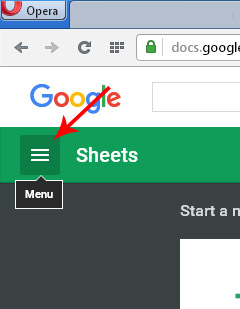
Since the issue is on a Microsoft Office Excel file, click on the Menu button on the left side then select Sheets. See image.
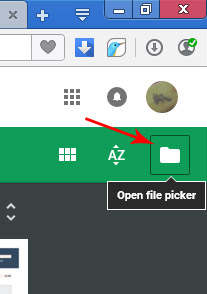
After that, click on the folder called “Open file picker” located on the right side of the screen to upload and open your file. See image.
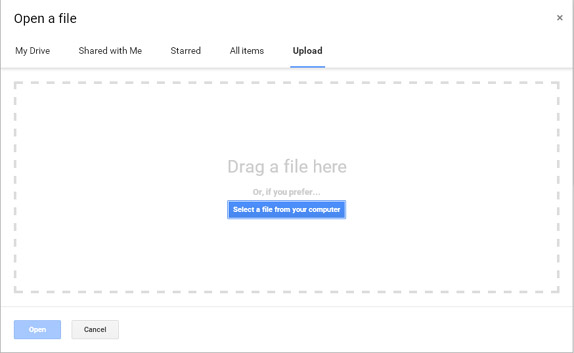
In the “Open a file” window, select Upload then click “Select a file from your computer”. You can also drag-and-drop a file directly to the window and automatically upload it. Once it is uploaded, select the file and click Open. See image.
And that’s it. You successfully opened a Microsoft Office Excel file on your computer without installing Microsoft Office Excel or acquiring a browser that can open a file straight from Microsoft Office Excel.
















