Asked By
anonymous
7060 points
N/A
Posted on - 09/02/2011

Hi,
I'm having the same problem, and I partly fixed it. My computer (Windows Vista business 32-bit) got a BAD virus that would create a new virus every time a program is opened, and give me an error message something like, "Runtime error access is denied, press OK to terminate the process".
I scanned my computer, it deleted 1121 viruses, and asked me to restart my computer. I restarted, and ended up just like you, a blank screen with a mouse. This is because no processes are running. Press CTRL + ALT + DEL and select Task Manager. Under Applications select "new task".
Type in Explorer and press Enter. You should see your background image and the taskbar as well as your icons but other processes aren't running. For example, I normally get Windows sidebar, when I start, now I don't. My plan is to back up everything and re-install the OS because it is all screwed up.
Then I'll be okay.
Hope this helps.
Runtime Error Access is Denied Virus
Hi,
You made a serious mistake to delete all 1121 viruses. They all are not viruses. They are your system files. But your Antivirus detected them as viruses because those files are corrupted by virus.
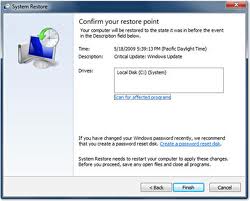
In order to solve this problem, use system restore option for restore your computer at previous time where your system files were working. In this way, you can go to a previous time of deleting files. Now scan and delete only virus files.
Other way is to use some data recovery software, for restoring your system files data, so that all progress can run in your computer. Then restart computer.
Runtime Error Access is Denied Virus
Hi,
Once files are deleted, 1121 viruses which all are not really viruses might cause abnormality of Windows. This will stop the process of some applications running, services and other executable systems and files.

Doing system restore and or a re-format of your computer is the best solution to this. You will really need to have a back-up to store your data saved, like documents, pictures and all those important files in your computer.
As you do a system restore, all files will be back to normal and this will run the applications and services to its original settings.
You may also re-start your computer and right click on system task bar, enabled the list of services, processes before it runs out and become disabled.