

Got an error while using a transaction in Simply Accounting System
Asked By
0 points
N/A
Posted on - 12/07/2011

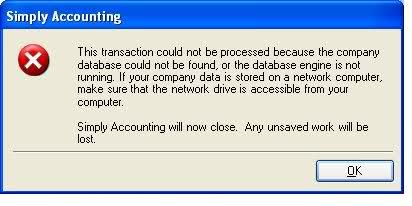
I was testing a newly installed Sage Simply Accounting Software on a PC with Win XP before I turned it over to a user when I got this error message.
Simply Accounting
This transaction could not be processed because the company database could not be found, or the database engine is not running. If your company data is stored on a network computer, make sure that the network drive is accessible from your computer.
Simply accounting will now close. Any unsaved work will be lost
The above error message appeared intermittently while I was testing the software. The database was stored on a networked server, and the connection seemed okay because I could ping the server’s IP Address.
Any advice on how to fix the problem?
Thanks.













