
I want to install Windows Live Essential 2012 on my computer.
But every time I tried, it shows an error message with a code number.
Now what can I do to install Windows Live Essential 2012 on my computer?
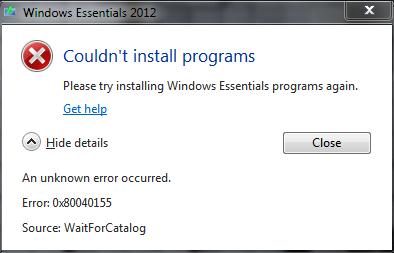
Couldn't install programs
Please try installing Windows Essential programs again.
An unknown error occurred.
Error: 0x80040155
Source: WaitForCatalog
Facing problem to install windows live essential 2012
Hello Charls,
A quick solution to that issue will be to restore the system back to a previous state when there was no such issue using the System Restore utility.
Note that when you perform System Restore, you may end up losing a lot of the current system settings. So before you go ahead and use this process, you will need to ensure that the system restore point is not too old, and then you will set a restore point for the current status.
Another workaround to that issue will be the following. You will need to check the Background Intelligent Transfer Service as follows:
-
Click Start, and then type services.msc in the Search Box and then press ENTER.
-
After that you will go to Background Intelligent Transfer Service.
-
Check if it is stopped and then start it.
-
But if it is started, you will need to stop it and restart it again. See if that resolves the issue.
Regards,
Carl
Facing problem to install windows live essential 2012
Dear User,
You can follow these steps to fix your problem. This can happen because you are using an online installer. To fix this you should download an offline installer.
Which you can from Windows Live Essentials 2012. Now install it using this setup. And you will not have this error again. Thank you.
















