Asked By
JepRey
410 points
N/A
Posted on - 06/20/2011

Hello,
I am currently on Windows 7 Starter ,but I'm trying to go back to XP because Starter has limited features. While installing XP, after loading setup files, my screen went blue with the following error:
"A problem has been detected and Windows has been shut down to prevent damage to your computer.
If this is the first time you've seen this stop error screen, restart your computer. If this screen appears again follow these steps:
Check for viruses on your computer. Remove any newly installed hard drives or hard drive controllers. Check your hard drive to make sure it is properly configured and terminated. Run CHKDSK /f to check for hard drive corruption and then restart your computer.
Technical information:
STOP: 0x0000007B (0xF78D2524, 0xC0000034, 0x00000000, 0x00000000)"
I'm doing a research on this issue, but up to now I have yet to find the solution. I'm confused. I've found that this is known as the 'Blue Screen of Death'. I tried Windows' suggestions also. I scanned for viruses and fixed disk errors (CHKDSK /f). But I still get the same error. Is it really my hard disk? Is there anyone here, who understands this problem? Please help me get over this.
Thanks in advance.
Error While Installing Windows XP
Dear Jeprey,
Blue screen means "there are serious conflict between hardware or software". For resolving this issue do some steps:
1. First take back up of all your data and save your necessary files from C Drive.
2. Insert windows XP CD and boot from CD Drive.
3. During setup, format your C drive with NTFS or Fat32 structure. Run only regular format not quick format.
4. Install your windows XP on C Drive.
-
If problem are the same then try to boot your computer with windows 98 CD and format your C Drive.
-
As and when you format your C drive, your windows xp will install easily and blue screen is gone.
Take care,
Jhony
Error While Installing Windows XP
That blue screen always appears whenever there is a problem on the connecting devices while setup is registering these components.
Error While Installing Windows XP
If you want to go back to window XP. you have to follow these steps. first if you have any necessary data make backup of that data and burn that data on a separate DVD or HD. Then insert your window XP cd or DVD into your cd room and restart your computer. there will be four option on your screen you have to select boot computer using cd rom.
Now you have to first format you drive that have Windows 7 and then install new fresh copy of window XP on your computer.
Answered By
saskia
0 points
N/A
#126559
Error While Installing Windows XP
Hello,
This error occur due to many reason:
1. Boot sector virus.
Please check your computer whether it has infected with virus, if you are infected please remove virus by using suitable virus cleaner. You can remove the hard disk and connect in to another computer and then you can check it.
2. Due to device driver.
During boot, boot controller need to configure device driver during the start up process. secondly this error can appear due to device driver corrupted situation or because of windows information registry corruption. you can provide additional device drivers by pressing F6 during the startup process. just press F6 when setup process mentioned "Press F6 if you have to install a third-party SCSI or RAID driver".
3. Due to a hardware error.
This can also happen due to hardware controller error. it can be a resource conflict, between SCSI devices in the system.
4. Due to hard disk error.
When your XP cannot locate your hard disk this error can also happen, you can use disk commands to check whether your hard drive is okay or with bad sectors or errors.
In general, to overcome this error. you can update your BIOS, check your hardware, provide additional drivers if needed, run setup in virus free environment. Restore registry backup.
Answered By
mdammad
0 points
N/A
#126562
Error While Installing Windows XP
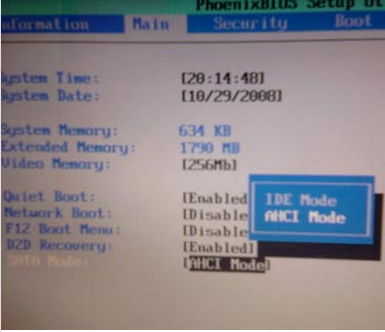
I hope that you have SATA HDD in your PC. You'll have to change SATA Configurations from BIOS. Enter the BIOS when the computer starts by Using F2 or F12 or as the system prompts when booting. Go to SATA operations and change AHCI option to IDE or ATA or Legacy (it depends on BIOS which option is given). Just change it from AHCI. Reboot now install XP.
Hope it'll install now.
Error While Installing Windows XP
If you are receiving issues on Windows XP installation, go to your BIOS settings. Restart your computer and when it opens, press the F2 key repeatedly. Search for the SATA / ATA menu. Ensure that the disk you are usinf has no dirt or scratches. When Windows XP keeps on restarting, go to your BIOS settings and press the Alt+d, Alt+e, Alt+f and ensure that the drivers are configured correctly.
Your computer will reboot automatically. Boot from the CD and start the installation again. Press the F8 key to agree with the terms and conditions.Do not select the fast installation, just press enter to start the installation. This will take some time. Just follow the on-screen instructions.
Answered By
Bleem
0 points
N/A
#126564
Error While Installing Windows XP
Hello Jeprey,
As analyzed problem of your pc the previous operating system used is windows 7 starter that can operate well but you try now to downgrade your operating system to windows XP. Ok first you need to identify what kind of hard disk used the common hard disk we used now a days like Serial ATA disk which has 7 pin connection and Parallel (Ultra) disk which has 40 or 80 pin connection. If you have no idea about this hard disk pin connection try go your bios screen for proper configuration. Press the desired key for the bios setting by pressing F2 or DEL key on keyboard if none of this key try to check your user manual book of the pc.
This STOP: 0x0000007B (0xF78D2524, 0xC0000034, 0x00000000, 0x00000000) error parameters appears when the selection of SATA MODE = ACHI mode. If used an operating system XP the selection would be SATA MODE = IDE mode because will turn off the high-performance features of the controller and put it into compatibility mode. Try to apply this friendly solution its 100% tested. See below image.
Its difficult to realized if the selection is only SATA MODE = ACHI mode in your bios setting because you need to update the firmware of your bios.
Error While Installing Windows XP
Error while installing Windows XP
Indeed, the Stop code: 0x0000007B (0xF78D2524, 0xC0000034, 0x00000000, 0x00000000) is a hard disk drive issue. You did a very good attempt to fix the issue when you tried check disk. You said it did not fix the issue.
This code is a SATA operation error. Before to start reinstalling windows, I suggest to check the SATA operation setting first. SATA Operation should be set to Autodetect. In order to do that, you need to go to the BIOS of the computer.
To get to the BIOS , you have to restart the computer. Keep tapping < f2> while the computer is still restarting .Make sure you hit <F2> several times before you see your computer brand’s logo. Remember to change the SATA Operation to Autodetect.
-
The setting is RAID Autodetect / ATA:Change the setting to RAID Autodetect / AHCI
-
The setting is RAID Autodetect / AHCI or IRRT:Change the setting to RAID Autodetect / ATA
-
The setting is RAID On or Combination:Change the setting to RAID Autodetect / AHCI
Then restart the computer.
Make sure to reinstall windows xp outside the OS.This means to say that you need to boot to the cd first .While the computer is restarting , you press any key. Make sure that the installation disc is already in before you restart the computer.
If the above troubleshooting failed, then you can go back to the BIOS and reset SATA Operation to its original state.
If still, you are not successful , then the hard disk drive is already defective and needs a replacement. You might want to call the computer manufacturer so they can send you the replacement provided that the system is still under warranty.
Error While Installing Windows XP
Hi,
For almost 5 years, I have been installing windows xp on many pc's and most of its errors has been already encountered. I hope, this following steps will help you to fix your problem while installing the windows xp in your pc. Just follow the following actions, First, On start up , press F2 to enter BIOS; Second,Expand the "Drives" section; Next, Go to "SATA Operation".
Then, Change this from "RAID Auto/AHCI" to "RAID Auto/ATA". If that solution still don't fix your problem, you should now visit the
Microsoft solution page.
Answered By
irfan905
0 points
N/A
#126567
Error While Installing Windows XP
Dear Jeprey,
I am also suffering from this problem during window installation, this is normally due to Hard Disk device problem. Simply replace or change the Hard Drive then your problem automatically solved. It's very easy solution for you. yes it is only Hard Disk Drive error and not other problem.
Answered By
amrabdo
0 points
N/A
#126568
Error While Installing Windows XP
This is actually a very common BSOD error when getting back to Win XP. STOP: 0x0000007B (0xF78D2524, 0xC0000034, 0x00000000, 0x00000000) INACCESSIBLE_BOOT_DEVICE. This is somewhat related to your HDD, it requires you to get into the BIOS.
Here are the steps to do so,
1. Power up the computer.
2. Press the Del key during the POST screen to enter the BIOS.
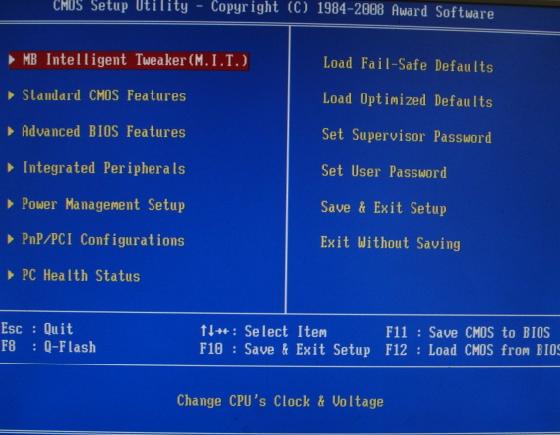
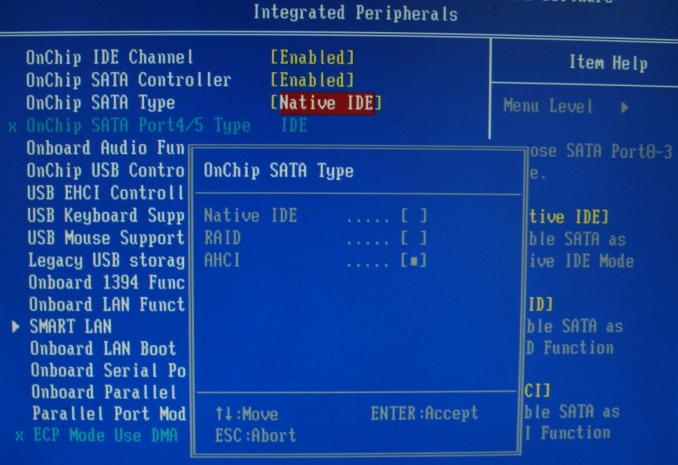
The screenshots attached shows the position of the SATA configuration. There are two listings about the SATA controller, On-chip SATA Controller and On-chip SATA Type. Move to the On-chip SATA Type listing and press enter, installing Win XP will require you to change the SATA mode to Native IDE/ATA mode; set to RAID if you want to configure a RAID setup. Note: You can later change the SATA type back to AHCI mode after installing your SATA drives in Win XP.
After doing the above mentioned steps, you can now save to CMOS and exit, the computer will restart automatically and voila, you’re done.
Error While Installing Windows XP
Hello Dear,
It is very common error and it has many reasons.
You have to check some of your hardware to come over this problem.
First make sure that your RAMs are working properly.
Check your ram with "Memory Diagnostic" utility. You can download it from this link.
http://download.cnet.com/Memory-Diagnostic/3000-2094_4-10629429.html
Some time due to dust the edges of RAMs became short circuited. Clean all edges of all RAMs and put them back into motherboard.
After that check your hard disk for bad sectors and also check that it is properly connected.
For this purpose visit this link to download "Hard Disk Testing Tool" free.
http://www.softpedia.com/get/System/Hard-Disk-Utils/HDD-Scan.shtml
Check all cables of hard disk and replace loose cables.
The problem will 100% resolved.
Thanks