
No of visitors who read this post: 951
Type: Question
Author: B Potts
No votes yet

Hello Experts!

I was using Autodesk Revit Architecture and importing my ‘autocad’ files when I got this error message (see below).  I wasn’t sure about the numerical data in my files.  Anyway, I have searched the web and did not find any possible resolutions to the problem.  I turned to this forum trusting that experts would know the resolution.  Anyone, please?  Thanks.
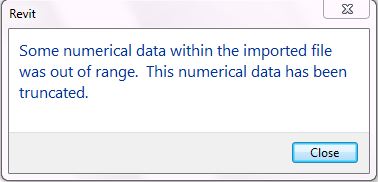
Revit

Some numerical data within the imported file was out of range. This numerical data been truncated.

Comment viewing options

Select your preferred way to display the comments and click "Save settings" to activate your changes.

#

Hi B Pott,

Sorry to hear that problem of yours. But don't worry because I'll help you out. That kind of error occurs occasionally when the content of the AutoCAD file is too far away from the origin point of Revit. There's about 10,000 x 10,000 outer limits of Revit an so to speak. Try to reset the base of AutoCAD closer to the objects drawn and then restart your computer . This is all what I did when I got that error.  I hope that this will solve your issue. I'll be glad if you inform me that this solution also worked for you.

Greg










