
Hello
I deleted kodak updater and Kodak easyshare software from my pc by using the remove/add programs feature.
After deleting easyshare, when I want to start my pc, I find an error Runner Filename (Kodak Software updater.exe) Lacks a" (the app id separator).
Please help me to solve this.
Thanks a lot.
Error Message Runner Filename Kodak software updater.exe?
One possible cause for this one is not all software updates associated with the program has been uninstalled in the registry values. Thus, creating a conflict during startup. There might be startup registry that is still associated with the software and cannot find its destination since you uninstalled it.
Try this:
Run a program called CCleaner.
Please install it. It is a free program. Once you have installed it. Please click on the "Cleaner" Tab at the left side of the screen shown with a broom icon. after that, click on "Run Cleaner" button u can see at the lowest right part of the program. Just wait until it is done. Next is to click the "Registry" Tab at the left side of the screen shown with a blue building block icon. Then Click on "Scan for issues" button and then you will be prompted to back up registry. Just click no. Then Click on "Fix Selected Issues" button. After that, restart or log off your computer.
If this does not work. try going to your Add/remove programs and see if there are any Kodak associated software programs that are still installed. Please uninstall them. after which, please do the CCleaner again. and Let us see if it will resolve the issue.
If Problem still persist. try to install the software again. And we will see if it works. Now, If the problem is still there. Please Try to perform System restore to the date you uninstalled the software.
Loida Arcel
Error Message Runner Filename Kodak software updater.exe?
The following is a step by step guide to help you solve the problem:
-
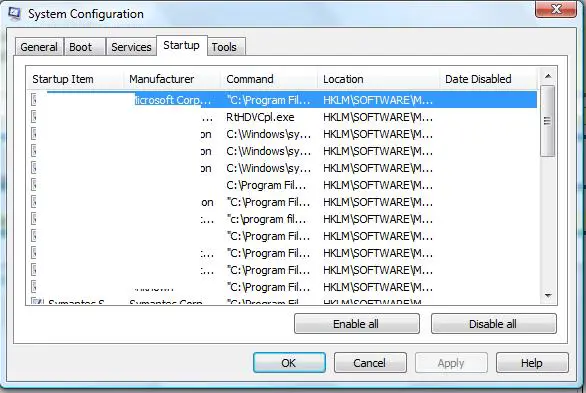
On your computer click the Start button and then type msconfig in the Search bar and then press Enter
-
After that go to the START tab and while there find the Kodak Updater in the list.
-
You will need to get rid of the TICK from the Kodak Easyshare and as well from the Kodak Software.
-
Once you have done that click APPLY, and then click OK.
-
The windows should look like the following:
-
You will need to click OK and then close.
-
If it the computer needs to RESTART just click YES to reboot it.
Regards,
Carl
















