Asked By
emalyn
0 points
N/A
Posted on - 06/18/2012

Hi guys,
Attachments in blogs get damaged.
The error message, given below, I get when trying to open or download an attachment.
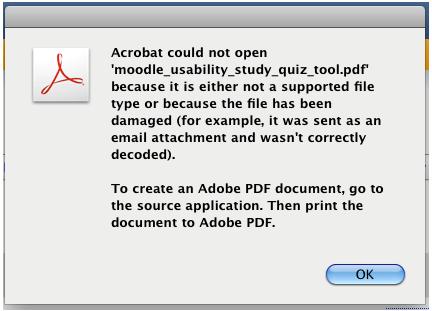
Acrobat could not open 'moodle_usually_study_quiz_tool.pdf' because it is either not a supported file type or because the file has been damaged (for example, it was sent as an email attachment and wasn't correctly decoded). To create an Adobe PDF document, go to the source application. Then print the document to Adobe PDF.
Can anyone suggest me about this issue?
Thanks for help.
Error Acrobat could not open
Hello friend,
This is an online issue, which is created because of encoding and decoding when we upload a file into the internet. If we upload a file to online, it will be encoded, when it happens there is chances of data loss. This will only appear when we try to see it through online. So my suggestion is to download it into another drive and then see it.
Otherwise try this : Try to bring it a memory card. And then try it again with that, this is causing because of treating an encoded PDF file as an ASCII file instead of a binary file. This issue has been found by Microsoft outlook, and they suggest to send or upload PDF files as .ZIP file only, otherwise there are chances of data corrupting. So only upload PDF files in ZIP format, it will give security to your file.
Hope you get the answer. Have a nice day.
Answered By
akhiroy
0 points
N/A
#155137
Error Acrobat could not open
Hi,
I can suggest some solutions for your problem;
Solution 1: One of the first things to try is updating your Adobe Reader to the latest version. You may also need to update your browser if you are using an older browser. Usually updating the Adobe Reader to the most current level fixes the problem.
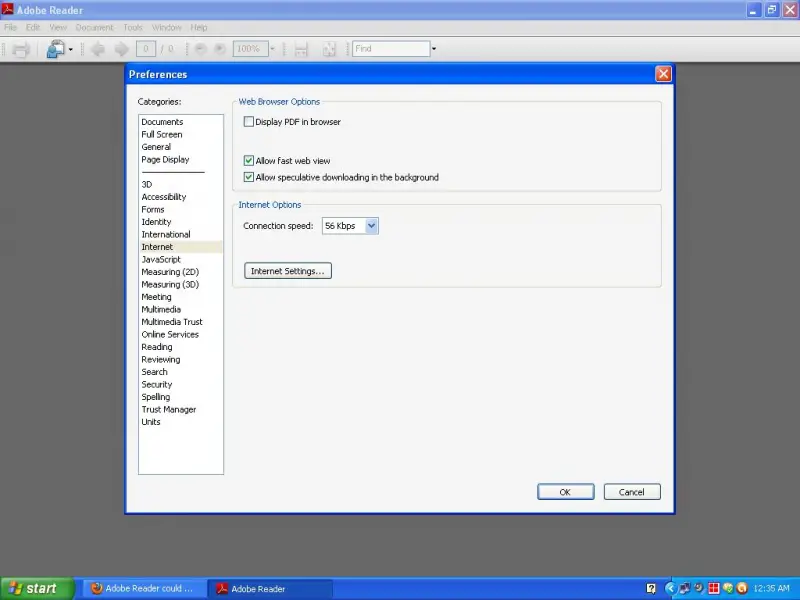
Solution 2: Adobe Acrobat Reader: Edit > Preferences > Internet > make sure the Display PDF in Browser box is not checked.
Thanks.