

Error 3259 iTunes while downloading
Asked By
20 points
N/A
Posted on - 08/21/2012

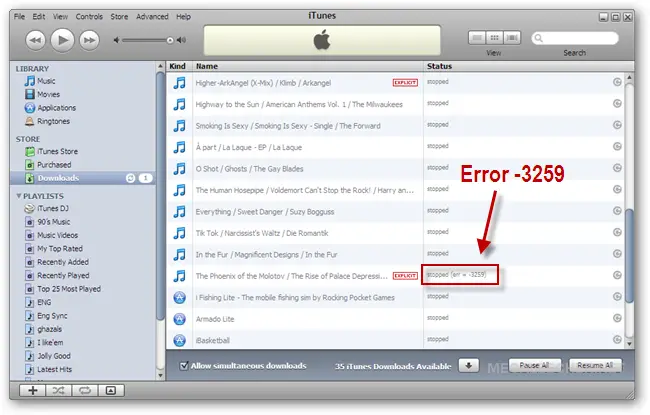
Error 3259 iTunes while downloading
- Why the itunes downloads stopped and shows an error 3259?
- How can i fix this problem?

Error 3259 iTunes while downloading

Hi,
Please do the following and get rid of the problem:
1. Check that your installed iTunes software is latest update or not. If not, update it.
2. Switch off firewall application.
3. Both don't work? Allow via firewall app iTunes software to work.
4. Choose the Apple Menu icon from the left corner of the screen.
5. Select the option System Preferences.
6. Click on Firewall tab located in the Security option.
7. Choose the lock icon in a case Firewall option were locked. You man need a password to unlock Firewall Settings.
8. Choose the Advanced button. Find iTunes icon and set it to the option 'Allow incoming connections'
I think your problem has been solved.
Hathy

This is actually a very common issue in iTunes which is caused if you are running an older version of iTunes, you have a very slow internet connection, or your firewall is somewhat preventing the program from connecting to some communication ports that iTunes require to have complete functionality. To see what went wrong, download and install the latest version of the client from Download iTunes 11.1.3.
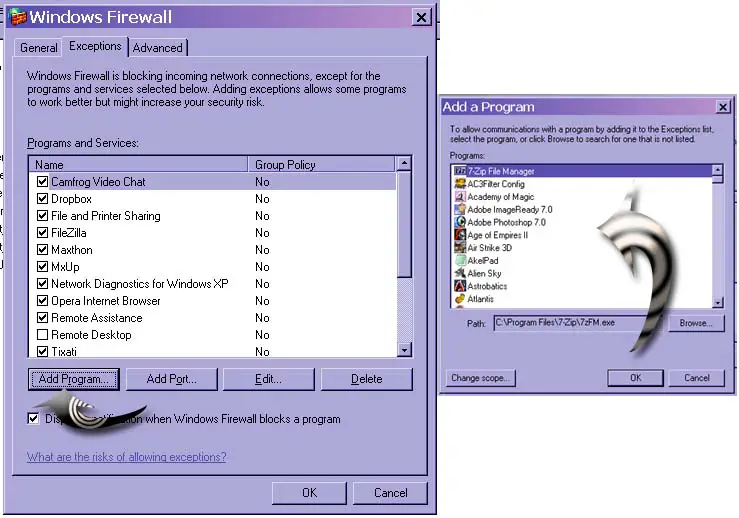
Once installed, try running it then try downloading the music again where the error appeared. You should not receive the error this time since you are already running the latest version. If you are still having the problem, try adding the program in the exceptions list of the firewall. For Windows users, click Start, Control Panel, Network and Internet Connections, and then Windows Firewall.
Select Exceptions tab, click Add Program, select iTunes from the list then click OK all through out. See image.
After adding, start iTunes again the restart downloading the file. If the problem is with your connection, this is maybe because you are downloading it during peak hours. Try doing it again during off-peak hours to have a better connection and much faster download speed.











