Asked By
martin
350 points
N/A
Posted on - 01/28/2012

Hi. I upgraded my MS Office 97 to 2003. I successfully installed it but received an alert after opening MS Word. Clicking on the Ignore button will quit the alert message and continue working. But every after opening Word, I am getting the same message. The error seems related with MS Access database which I don’t fully understand. What do I need to configure to be able to resolve the issue? Help me.
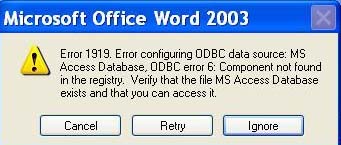
Error:
Microsoft Office Word 2003
Error 1919. Error configuring ODBC data source: MS Access Database, ODBC error 6: Component not found in the registry. Verify that the file MS Access Database exists and that you can access it.
Cancel Retry Ignore
Error 1919 on MS Office 2003
This error happens usually whenever a Corel program is removed from your system. The following registry subkeys are missing on your system:
HKEY_CURRENT_USERSoftwareODBC
HKEY_LOCAL_MACHINESOFTWAREODBC
Of course, if you’re missing these sub-keys, then replacing them is the way to go.
It would have been better if you also mentioned the Windows version you’re using. And since we’re dealing with the registry, you have to be very careful when performing revisions to it. I found a KB ( knowledge base ) article from Microsoft regarding this issue and you can access it by clicking on the link below:
https://support.microsoft.com/en-us/help/324520
There are several methods by which one can restore the missing keys and they are well explained on the article mentioned above. Just make sure to pick what’s appropriate for you and be careful with the registry changes. Good luck!
Error 1919 on MS Office 2003
Hello Martin,
It seems to be a common problem with MS office 2003. It can occur in different programs in MS office and is not associated with only one program like Word, PowerPoint or Access. Luckily we have a solution to that. You should first of all install MDAC 2.8 It should solve the problem but if it doesn't work, you should reset the registry keys by using the Mdac.inf. file. You can read the whole steps on Microsoft's support website to get a step by step instructions on that. It should work.
I hope that solves the problem.
Abe.
















