
We want our documents to be secured so we are using encryption software for PDF, I've read about this encrypt PDF so I tried and download it but whenever I ran the installer it is giving me this error.

C:Installerencryptpdf_cmd_v2.3encryptpdf.exe
C:Installerencryptpdf_cmd_v2.3encryptpdf.exe is not a valid Win32 application.
Encrypt PDF not a valid win32 app
Hi there,
Remember that win32 application validation greatly depends on downloading source and packages, if your downloaded file is corrupt and not properly extracted it will give an error in validation of an application!
Go to this link to download proper and complete package for Encrypt PDF and make your way easier, "http://dl.verypdf.net/encryptpdf_cmd.zip"
Note:
Don't forget to completely remove previous installed encrypt PDF and remove it completely from your system, then download using this link and install, then reboot your system and try encryption again!
Hope it works for you!
Encrypt PDF not a valid win32 app
In order to set PDF secure to keep your PDF document from being opened or change by others freely, you can use very PDF Encrypt PDF command Line Encrypt PDF command Line encrypt-PDF-command-line to help. This application is an MS-DOS oriented program.
Click the following link to download the application that o need to use:
Download Encrypt PDF command line
Call executable file encryptpdf.exe in the extracted folder of the program. After opening MS-DOS interface, you can drag encryptpdf.exe and drop it into the interface, then hit Enter button to see its usage.
Follow the command line template below to write your own command line:
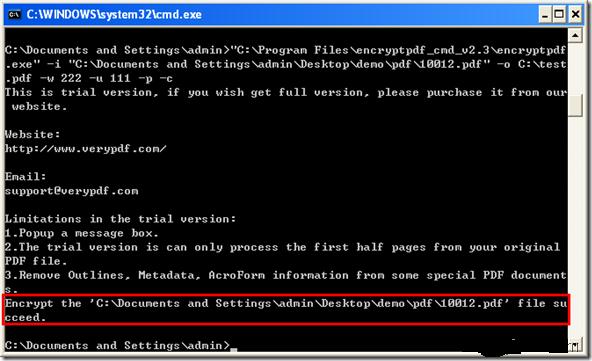
Command line is
“C:program Filesencryptpdf_cmd_v2.3encryptpdf.exe” –I “C:Documents and SettingsadminDesktopdemoPDF10012.pdf” – o C:test.pdf –w 222 –u 111 –p –c
In the command line,
-
I “C:Documents and SettingsadminDesktopdemoPDF10012.pdf” describes the path of the input file.
-
C C:test.pdf is for setting the path to target file.
-
W 222 is to set an owner password as 222.
-
U 111 is to set user password at 111.
-
P is to set print permission.
-
C is for setting copy permission.
At the end, hit Enter button .In the created secured PDF file, you can see its information by using the shortcut key Ctrl + D.
See the snapshot below.

Encrypt PDF not a valid win32 app
In programs or when installing programs, I normally encounter an error message with “is not a valid Win32 application” when the program is not compatible with my system like when it is designed to run on an older operating system. In your case, check the system requirements of the program you are using and make sure your computer meets those requirements.
If you verify that the version you have is compatible with your system, check if it is an old version or if it is a trial. If it is an old version, try updating to the latest or to a newer version if you can’t install the latest. If it is a trial, the trial period must have expired that’s why you are seeing that error.
In this case, purchasing the software should fix the problem. If you want to encrypt a PDF file, here are three programs you can try. First is VeryPDF Encrypt PDF. It supports Windows 98, Windows Millennium, Windows NT, Windows 2000, Windows XP, Windows Vista, Windows 7, Windows 8.x, Windows 10, Windows Server 2003, and Windows Server 2008. Another is Encrypt PDF.
Third application you can try is Free Encrypt PDF. It supports Windows XP, Windows Vista, Windows 7, and Windows 8.x.
















