
Hello, my Easify business software is not being able to load reports and it is displaying the following message. Can any one tell me, why is this happening?
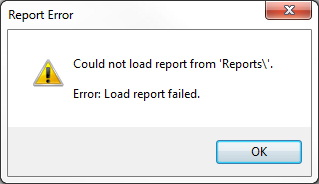
Error: Report Error
Could not load report from 'Reports'.
Errror: Load report failed.
Easify business software load report error
Hi,
Read attentively:
1. The common reason when you have just installed for the first time and the computer has not been restarted. If it is the reason, just restart the computer and try. It will be ok this time.
2. Not so common but may be over paranoid 'firewall or antivirus software. If this is the case, change the setting accordingly.
3. If your Easify installation gets tampered with, check that the EPOS logo image file can be found at the location below:
V3.52.1.2 and below
For Windows XP, Vista or 7 (32-bit)
'C:Program FilesEasifyimagesEPOSLogo.jpg'
For Windows XP, Vista or 7 (64-bit)
'C:Program Files (x86)EasifyimagesEPOSLogo.jpg'
V3.52.1.16 and above
For Windows XP, Vista or 7 (32-bit)
'C:Program FilesEasify<COMPANY_NAME>imagesEPOSLogo.jpg'
For Windows XP, Vista or 7 (64-bit)
'C:Program Files (x86)Easify<COMPANY_NAME>imagesEPOSLogo.jpg'
4. At last reason may be: if you run Easify on a domain where you may have some strict 'group policy setting'. If it is the case, make sure this folder and its content have read and write permission.
Have your problem been solved? I think yes.
Hathy















