Asked By
joe0229
0 points
N/A
Posted on - 08/19/2011

I have been reading forum posts (including this particular forum) and articles for an hour and still haven't found the solution. So hopefully, someone could shed some light. Lately, my downloads keep stopping halfway through. These include:
1. Getting 'direct' files.
2. Files from upload services like Rapidshare, Mediafire, etc.
3. Streamed media like YouTube, Imeem mp3s, etc.
I've been trying different internet sources like university WiFi connection, hotspots, a friend's wireless modem and my own subscribed connection from data outlets on the wall. I have also scanned my laptop with AVG, Ad-aware and Kaspersky, and it seems to be clean, still the problems persist.
Answered By
Boboy99
0 points
N/A
#115200
Downloads Keep Stopping after regular intervals
There could be some factors to consider why your download stops halfway.
Please note the following:
-
Not enough drive space: Check out the current size of your hard drive before downloading something.
-
Technically, the download folder is stored by default in the C: which is of course used by the OS and any other installed programs which might get populated too early. Always use the setting that always asks where to save file. To do this, in your browser select tools and then options. On the General tab Check the box at always ask me where to save file label and click OK button. In this new setting, you will be prompted where to save the file you are about to download. Try saving the file on your flash disk or external media for experimental purposes.
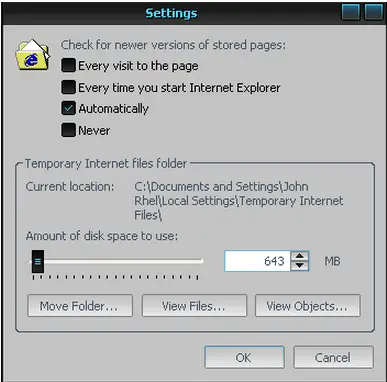
2. Increase size restriction on your temp file: This might do the trick:
-
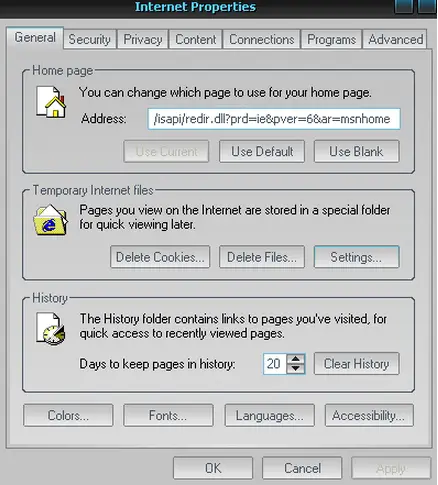
On the control panel, select security center and then internet options. On the General tab, click settings.
-
On the settings, you can adjust the current size of your temporary internet files folder.
3. Install the latest service packs. This is very essential for program stability and compatibility to the current software release.
4. Launch System Restore to return to the previous state where you can still download files without problem.
5. If all of the above fails, reinstall the operating system to gain the default settings.















