
Hi,
How one can detect network "sniffer"? Is it designed to collect data that is flowing across a network.?
The data can be useful for many purposes, including troubleshooting, network traffic analysis, and security purposes. However, the data can be used for illegitimate purposes, such as a network attack.
This type of data can also be used for illegitimate purposes, including data theft, unauthorized access on passwords, and networking mapping (reconnaissance).
This type of passive network attack can be difficult to detect.
Thanks.
Detecting network Sniffers to collect data
Tool anti-sniffing: PromqryUI allow you, enables you to detect network sniffers, running on Microsoft Windows Server 2003, Microsoft Windows XP and Microsoft Windows 2000.
PromqryUI allow you to be the tool which has a graphical user interface of Windows. You can determine with precision, if a team has managed network interfaces, it is running in promiscuous mode, if the computer is running Windows 2000 or a latest version Click here
Steps to run the anti sniffer:
-
The interface of PromqryUI allows you consists of two panels. The left pane displays the query systems, and the right pane display the output that is generated when you click the Start button the query.
-
To add systems to the list of systems of consultation, click Add
-
Systems can only be added by IP address or name. If a name is added, PromqryUI allow you to try to resolve the name to an IP address by clicking the Start button the query.
-
If the name cannot resolve to an IP address, the query you can use the Edit menu to set the ping options and the detailed described above.
-
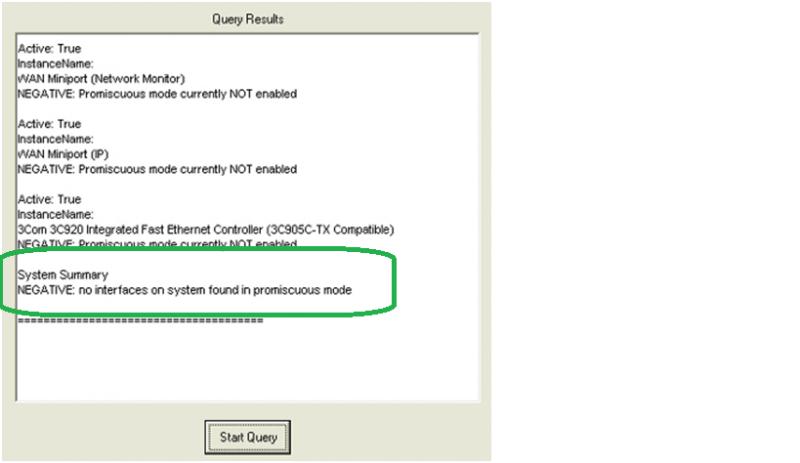
If there are no interfaces are running in promiscuous mode, you will receive a message that there is no promiscuous mode
-
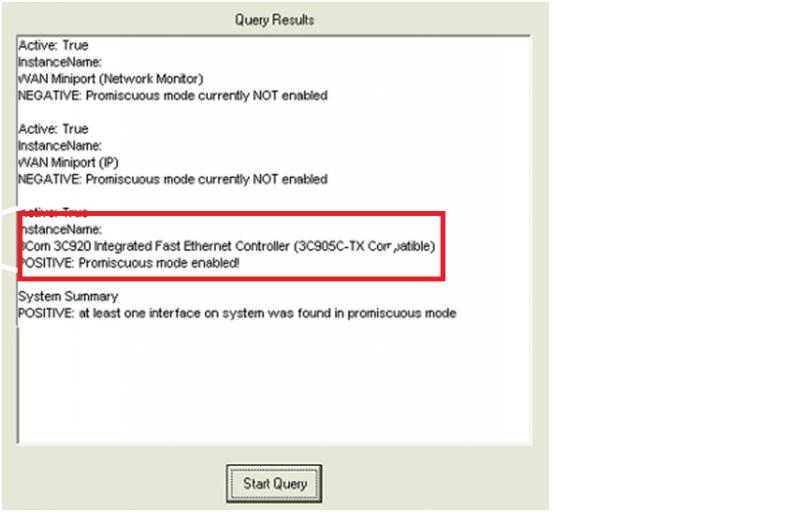
If there are interfaces that are running in promiscuous mode, you will receive a message that is a promiscuous mode
Listed below are the steps to run anti sniffer: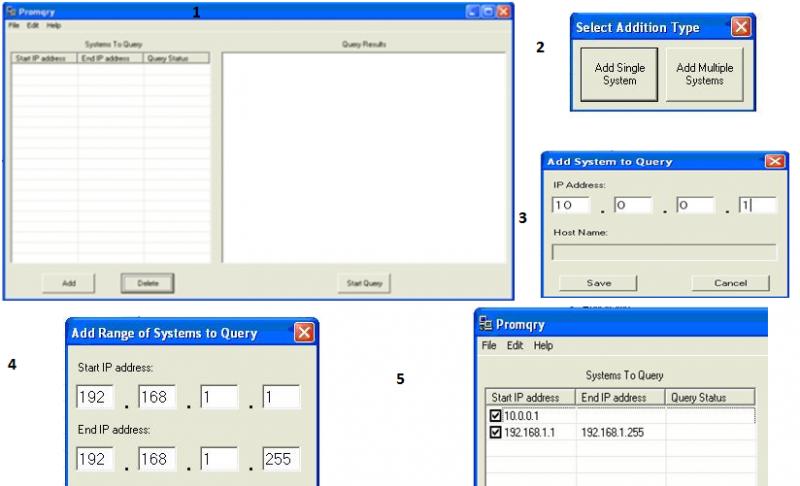
Answered By
Joven25
0 points
N/A
#128198
Detecting network Sniffers to collect data
Good morning!
So you want to help, know how to detect 'sniffer'. I think I can help you.
Sniffer collects data and is very difficult to detect, especially when running in a shared Ethernet. This is a summary of their detection methods:
METHOD of PING – send a ping request, with the use of the IP address of the suspect machine. But not the MAC address. No one should see this package, because the Ethernet adapter will reject, as that does not match your MAC address. If the suspect machine is running a sniffer, only respond without disturbing the rejected packet with a destination MAC address differs. This is the old method and reliable no more.
ARP METHOD – a hidden machine of ARP. So we send not ARP broadcast. A machine in promiscuous mode hides its ARP address. Then we send a broadcast packet ping with our IP, but with a different MAC address. Only computers that have our correct MAC address, ARFframe checked, are the only one that will be able to respond to our request for the ping of broadcasting.
On the LOCAL HOST – often, after that your machine has been compromised, the intruder will stop sniffers, to take/commitment other machines. On the local computer run ifconfig in the machine and clean the output will be:
ETH0 Link encap:Ethernet hwaddr 52:54:05:3:95:01
Inet addr 203.199.66.243 Bcast:203,199 . ..
BROADCAST MULTICAST MTU FUNCIONANDO: 1500…
Pero en una máquina con un rastreador de la salida es esto:
ETH0 Link encap:Ethernet hwaddr 52:54:05:3:95:01
Inet addr 203.199.66.243 Bcast:203,199 .
















