Asked By
Truman
650 points
N/A
Posted on - 06/02/2011

My PC time and date is automatically changes every time I restart the PC. This is a very old machine and has the below configuration:
Motherboard: MSI
Processor: Intel Celeron 2.26 GHz
RAM: Twinmos 512 DDR1
Every time I start the PC, getting a black window with different instructions of hardware components like CMOS checksum error or floppy disk fail. To access operating system I need to press F1 key. Every time I need to change date and time manually. I thought motherboard battery is damaged and already I have changed it but getting no new outcome. Due to this problem my mail sending and receiving time is also changing automatically. How to solve this problem? Is this a motherboard problem or any other hardware problem?
Date and Time Changing Automatically in My Desktop
Hello Truman!
CMOS checksum errors are usually caused by a dead BIOS battery, that battery would be a small flat battery, which are most of the time watch batteries, some are as large as a quarter while others are really small. They keep the date and time when the computer is shut down or unplugged.
Floppy Disk Fail errors are cause when the floppy disk drive is disconnected or damaged. Another cause would be that the BIOS settings have been altered. Did you play with the BIOS settings accidentally?
Here are a few solutions that you can try that may be able to help you out:
-
Make sure the battery you used to replace the old one is actually working. There are times when the brand new battery does not actually work because of human error in packaging. Believe me this happens sometimes!
-
If you strongly believe the battery is not the issue the CMOS checksum error should disappear unless there are other alterations with the BIOS settings. Restart your computer and enter your BIOS settings by pressing either F2, DEL or INS, it really depends on what BIOS you are using so just look for the instruction on start up on which button to press. Once inside, input the correct time for the system clock. Don’t forget to save before exiting.
-
If for some reason one of your drives suddenly becomes unrecognized go back to your BIOS settings and select Auto Config or Auto depending again on the BIOS you have.
-
In regards to your “floppy disk fail” problem, make sure that your floppy disk drive is properly connected to your motherboard. Remember, to unplug your PC every time you open your tower because even if it is turned off there is a small chance you can get electrocuted, not fatal, just really uncomfortable.
-
If the “floppy disk fail” error still persists, enter your BIOS and double check if the correct type is selected and is turned ON. Unless of course you don’t actually have a floppy disk drive and it just shows that error, simply set it to NONE or DISABLED.
-
If your time and date is still incorrect, there may be a virus involved. Run a good anti-virus program and see if it detects them.
-
If the problem still continues you may have to perform a system restore, try to remember a time when this problem doesn’t occur and set that day as the restore point.
-
You need to press F1 to start the computer, to work around this problem there is a trick that you can do. Go into your BIOS settings and set the “Halt On” to “NO ERRORS”. It will skip the F1 to start problem completely.
I hope this helps you with your problem, let me know if it works and also let me know which one worked for you. I’ll be keeping an eye on this thread so give me an update.
Good Luck and Have a Great Day!
Date and Time Changing Automatically in My Desktop
-
It may be cause of the your BIOS and the time sell for PC but you can also check the software for time and date and update it as per your requirements.
-
These are some simple steps to be taken and you will be easy with your problem.
-
Go to Control panel and then to Regional and language settings set the location time and date and language here after this to time and date settings and then select your time zone and in internet time check the box saying " Automatically synchrony . ….."
-
And finally in date and time set your date and time. This will set your pc time for all and now its no need to set it every time you login.
-
If the problem remains then you can change your cell for time as i have shown one here.
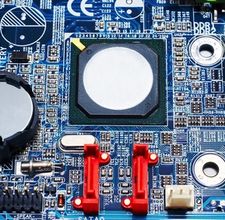
It will solve the problem.
Answered By
sofieV
0 points
N/A
#112035
Date and Time Changing Automatically in My Desktop
I'm experienced the same problem before. I'm glad for all your responses. Unfortunately, I found out that hte problem is my PC> 🙁















