

Configuring Windows Do Not Shut Down – Windows 7

I wasn’t expecting to have “Configuring Windows Do Not Shut Down” displayed on my PC screen for hours.
This was after updating Windows and rebooting. Now, it wouldn’t start up because I shut down my PC even if it said I shouldn’t do so. Restoring to a date before the updates finally brought back my PC to life but it also produced error messages.
A few programs like the Google Chrome Updater are not working. I also cannot hear HDMI sound.
I have attached a picture to show the error message I got when I tried to restore my PC to a later date.
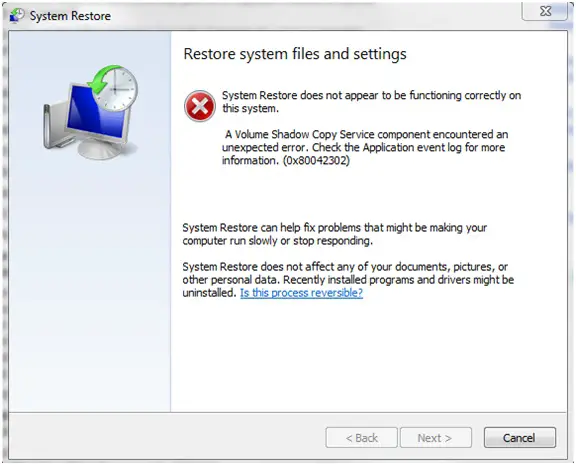
System Restore
Restore system files and settings
System Restore does not appear to be functioning correctly on this system. A Volume Shadow Copy Service component encountered an unexpected error. Check the Application event log for more information. (0x80042302) System Restore can help fix problems that might be making your computer run slowly or stop responding.
System Restore does not affect any of your documents, pictures, or other personal data. Recently installed programs and drivers might be uninstalled. Is this process reversible? Back Next Cancel This is the log from TSG SysInfo: Tech Support Guy System Info Utility version 1.0.0.2
OS Version: Microsoft Windows 7 Home Premium, Service Pack 1, 64 bit
Processor: AMD Phenom(tm) II X4 925 Processor, AMD64 Family 16 Model 4 Stepping 2
Processor Count: 4
RAM: 6135 Mb
Graphics Card: ATI Radeon HD 5450, 1024 Mb
Hard Drives: C: Total – 598652 MB, Free – 296303 MB; D: Total – 11595 MB, Free – 1668 MB;
Motherboard: FOXCONN, ALOE
Anti-virus: avast! Anti-virus, Updated and Enabled Does anybody here have the same problem?
If you’ve found the answer, please let me know.
Thanks













