

Changing from IE to Mozilla
Asked By
10 points
N/A
Posted on - 03/08/2012

when I open a link in word it directs to Internet Explorer.
I want to change it to Mozilla. How can do that?

when I open a link in word it directs to Internet Explorer.
I want to change it to Mozilla. How can do that?

Hey kate!
The reason of opening link in Internet Explorer is that your Default browser is set as Internet Explorer
To solve this problem you have to set Mozilla as your default browser.
For this purpose, do the following steps.
1. Open Mozilla Firefox.
2. Click on TOOLS.
3. Go to Option and click it.
4. A new window will open. In this window move to the ADVANCE tab.
5. In Advance tab, click on General tab (normally already at general tab).
6. Click on the Check now
7. A message will prompt when you click on Check Now "Firefox is not currently your default browser, do you want to make it default browser?"
8. Click Yes and you are done.

Besides the steps described above, there is another way of changing the default browser of Microsoft Windows. This is through Set Program Access and Defaults which can be found in the Add or Remove Programs applet in the Control Panel. Here’s how you can do it. Click Start, Control Panel, Add or Remove Programs, Set Program Access and Defaults, and then click Custom. See image.

In “Choose a default Web browser”, select Mozilla Firefox and then click OK. Before starting this procedure make sure Mozilla Firefox is already installed. Because if not it will not be listed in the available web browsers. See image.
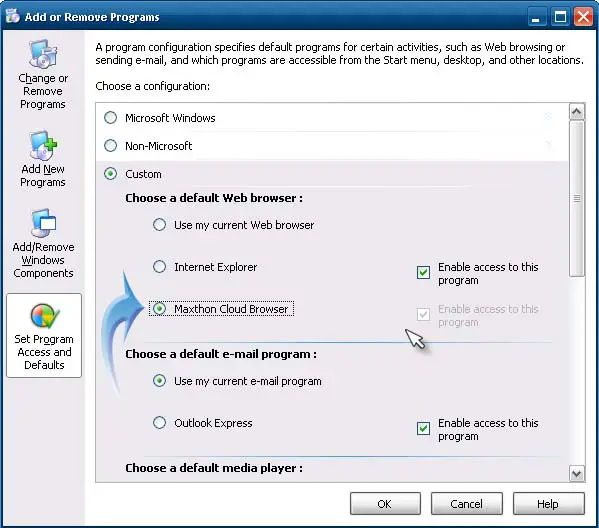
After this, every time you click a link in any application, Mozilla Firefox will be launched automatically instead of the previous Microsoft Internet Explorer. You can also go back to the previous web browser by repeating the steps above and then selecting Internet Explorer in the option. You can also change other default programs on your computer by changing other settings in the window.
Just check other available settings at the lower part of the window.











