

Certificate error message while launching any version of Outlook

Hi everybody,
Recently, all my Outlook users get this certificate error message twice, when they launch Outlook (doesn't matter what Outlook version, it happens on all of them) and connect to the exchange server.
It comes up twice, they click yes twice, and it doesn't come back until the next time they open/close outlook.
If you View the certificate and install the certificate, the error still comes back.
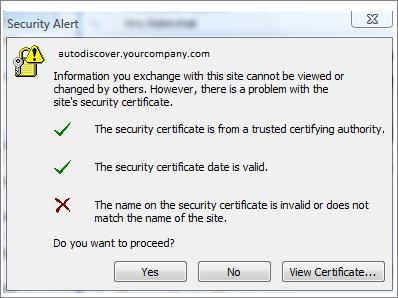
Security Alert
sites
Information you exchange with this site cannot be viewed or
changed by others. However, there is a problem with the
site's security certificate.
The security certificate is from a trusted certifying authority.
The security certificate has expired or is not yet valid.
The security certificate has a valid name.
Do you want to proceed?
Yes No View Certificate.
There is a complex Microsoft KB article showing about 6 settings that need to be modified in the command-line interface of Exchange 2007. I just don't think this is proper for the problem.
Has anyone else had this come up on Small Business Server 2008 / Exchange 2007?
Do you have a solution?













