Asked By
SteveHawk
0 points
N/A
Posted on - 09/06/2011

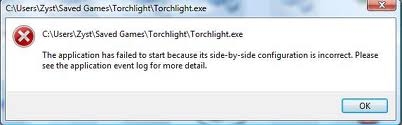
Hello, I need help with a game I just installed on my computer. It’s an RPG game called Torchlight. The installation went okay but when trying to play the game, I received the message that application failed to start because it’s side-by-side configuration is incorrect. Please see the application event log for more details. I am using Windows Vista 32 bit and according to the web site, it is compatible with the game. I tried to uninstall then reinstalling it but with no luck. Help please?
Steve Hawkins
Answered By
Jhody
0 points
N/A
#122050
Cannot open game, side-by-side configuration is incorrect error.
The game is compatible with the Windows version you have but have you checked if your system meets the minimum requirements of the game. Try opening the game’s Help option and check its minimum requirements to run the game efficiently.
Some factors that should consider when playing a game is first, the required processor speed, next the graphics adapter, next the hard drive space, then the required version of DirectX, and so on. It is important to know the specifications of the game because there are games that require high 3D acceleration with high built-in memory. And sometimes the game may require you to download a file like a patch so it will be playable.
Cannot open game, side-by-side configuration is incorrect error.
That sort of error appears to be a problem with Microsoft Visual C++ 2008 Redistributable Package (x86). It has runtime components for Visual C++ libraries. I suggest you reinstall that. Here's the download link:
http://www.microsoft.com/en-us/download/details.aspx?id=29
I suggest you uninstall the current version that you have and reboot before you start installation of the new one that you downloaded. Also, try to run Windows Update just in case there are any hotfixes to the redistributable package.
I run the game myself under Windows 7 64-bit and it works flawlessly. It doesn't have a very high system requirement which makes me doubt that your system will not be able to run it.
















