
During installation of TI-Nspire Family Software I am getting an error message saying that the software is already installed though I have not done it yet. I do not know why it is happening.
What should I do now?
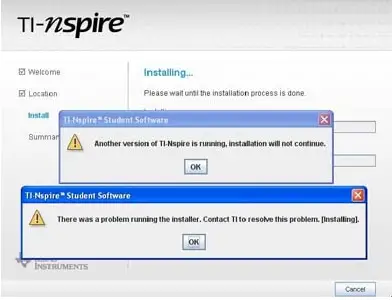
Error:
TI-Nspire™ Student Software
Another version of TI-Nspire is running. Installation will not continue.
TI-Nspire™ Student Software
There was a problem running the installer.
Contact TI to resolve this problem. [Installing].
Cannot install the TI-Nspire Family software
Sometimes when you download a software, it can be downloaded twice, missing your concern. Or when you install it, it's also can happen twice. So if TI-Nspire Family Software can't install and an error message displayed on the screen, probably the problem has occurred I told you before. So you have to remove your latest software from your PC. And make a try to remove the existing copy them.
In doing this, follow the steps below:-
If you are using windows XP then go to start button.
And go to Settings > Control panel.
Double click on add or remove programs.
Now a list will be open that contains a program that is installed in your computer.
Here just find out TI-Nspire Family Software and remove it from your PC.

Now download again the full version of the software. And installed it again to your pc.
If it not works, you must be paid a visit here- https://epsstore.ti.com/OA_HTML/csksxvm.jsp?nSetId=109606
Here you can solve your error problem more efficiently.
Cannot install the TI-Nspire Family software
Hi.
It seams that the installation program is corrupted. On back of every Texas Instruments calculator is a reset button. Press it with a paper clip and reset your device. Also make sure that you don`t use keypads from other model. If so, replace keypad, reset your device again and install TI software. If it still does not install you should contact Texas Instruments with exact problem and ask them for a new keypad. To contact TI use their online form. It is found here Texas Instruments contact form.
Queen Norman
















