Asked By
robiul420
0 points
N/A
Posted on - 08/11/2012

When I tried to update my Adobe Acrobat Reader from my PC, after a few time the below message was shown and update was failed. Please suggest what can I do?
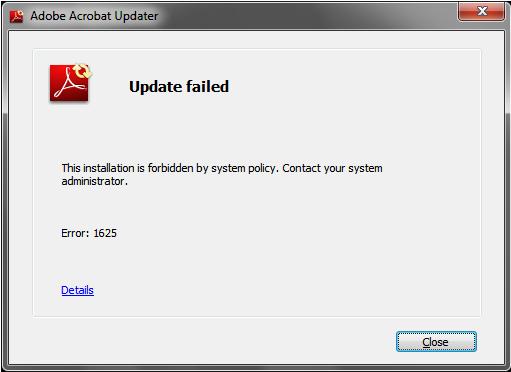
Error Message:
Update failed
This installation is forbidden by system policy. Contact your system
administrator.
Error: 1625
Adobe Acrobat Reader Update Failure!
To solve this, you have to run the Adobe Acrobat Reader as the Administrator.
You can use the Run as Administrator menu option in your Adobe icon located in your desktop.
Choose Help then Check for Updates.
Follow onscreen instructions. You can be able to update successfully.
Or search for a patch to whatever version your Adobe is, install it then run.
I hope you can solve your problem with this solution.
Answered By
Ezime
0 points
N/A
#162979
Adobe Acrobat Reader Update Failure!
Hi,
The simple solution sir is you need to download/update Manually using the Adobe Acrobat Reader
Here is the link to download Here

Hope this works
(note: if you are running in Windows 7 / Vista please don't forget to Right Click->Run as Administrator
Thank you :D..
The system requirements for adobe acrobat :
-
Intel® 1.3GHz processor or equivalent
-
Microsoft® Windows® XP Home, Professional, or Tablet PC Edition with Service Pack 2 or 3 (32 bit and 64 bit); Windows Server® 2003 (with Service Pack 2 for 64 bit); Windows Server 2008 or 2008 R2; Windows Vista® Home Basic, Home Premium, Business, Ultimate, or Enterprise with Service Pack 1 or 2 (32 bit and 64 bit); Windows 7 Starter, Home Premium, Professional, Ultimate, or Enterprise (32 bit or 64 bit)
-
256MB of RAM (512MB recommended)
-
2.14GB of available hard-disk space
-
1024×768 screen resolution
-
Microsoft Internet Explorer 6.0, 6.0 with Service Pack 1, 7.0, or 8.0; Firefox 2.0, 3.0, 3.5 or 3.6
-
Video hardware acceleration (optional)
Adobe Acrobat Reader Update Failure!
Acrobat reader update failure is a big problem for acrobat reader. When it seems a big problem to download an update for acrobat reader, you can go through this website
This website helps you get some tutorial.
With the help of these tutorials, you may solve the problem of updating.
















