

Add Standalone Host Error Connecting to my Vcenter
Asked By
110 points
N/A
Posted on - 06/18/2012

Hello!
I’m having some trouble connecting to my Vcenter. The database it uses is SQL Express 2005 SP1.
And every time I attempt to connect my ESXi Server to it, I get an “Add Standalone Host” error.
Then it freezes and restarts. I can’t find a way to work around this problem.
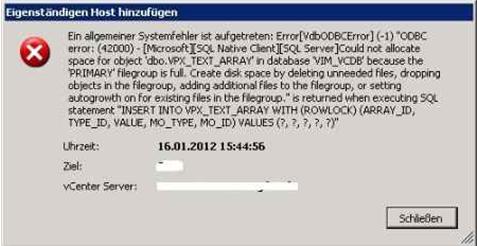
Eigenstfindlgen Host hinzuklgen
En algemener Systerneenler 1st aufgetreten: ErrogircbODIKErrot) (-1) "CC6C error • (12(00) – [MkrosortISOl. Native Ckrt491)1. Serwe]Could nct allocate space roe object *dbo.VRX_TEXT _ARRAY n database VIM_VCD6 because the PRIMARY rilectoup es ful. Create cid: space by deletng unneeded Nes, droPPN objects in the file? oup, adding addhonal Nes to the Negrotp, or setting &Coq owth on for exisung f ks in the f &now: es rekurned when executing Kt statement *INSERT INTO VPX_TEXT _ARRAY WITH (ROWECCK)(ARRAYJD, TYPED, VALUE, MO_TYPE, M030) VALUES (?,?,?,?,?)"
I hope someone has been able to figure this out and can help me with it.
Thanks!













