Asked By
mat123456 10 points N/APosted on - 08/11/2012
Hi Friends,
I have one mp3 file. I want to change its metadata or some properties. but when I do it, I am getting following error message.
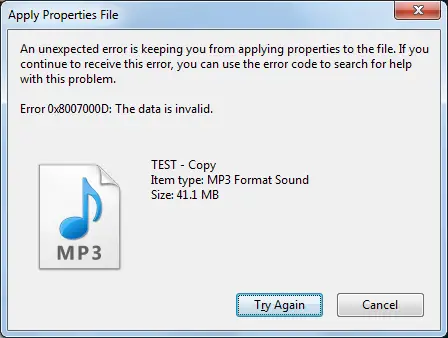
Apply Properties File
An unexpected error is keeping you from copying the file. If you continue to receive this error, you can use the error code to search for help with this problem.
Error 0x8007000D: The data is invalid.
Test – Copy
Type: MP3 Format Sound
Date modified: 6/16/2011 10:31 AM
Size: 41.1 MB
You will have to download the Mp3tag that you can get for free from the internet – but you can it can be worth a donation, especially because the Media Player 12 no longer has got an Advanced Tag Editor.
Once you have done the above, you will do the following:
You will go to File, and then look for Add Directory.
Next you will need to locate and select the album that is showing the following error code: 0x8007000D.
You will have to choose all the songs.
After that you will right click and then you will select Remove Tag.
Maybe you are trying to change to a metadata that is not compatible with your OS. Try to upload the music file in www.skydrive.live.com and use your valid Live ID. Or register if you don't have one yet. You can also change the data tagging from ID3 version 2.4 to 2.3.
Before modifying the metadata of an MP3 audio file, make sure the file is not in “read-only” state because if it is, you can’t modify anything. To check the file’s attribute, right-click the MP3 file you want to check then select “Properties”. In the MP3 file Properties window, in “General” tab, make sure “Read-only” is not checked.
If the box is checked, uncheck it then click “OK” to disable read-only. Try editing the metadata again then see if it works. Another way to edit an audio file’s metadata is with Windows Media Player. Start Windows Media Player then load the MP3 file you want to edit. This will automatically play the file. Stop the playback then go to “Library” tab.
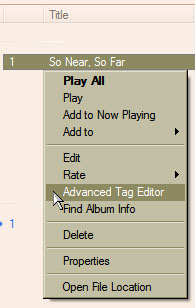
Select “Songs” on the left pane then locate the MP3 file you opened. Under “Title”, right-click the MP3’s title then select “Advanced Tag Editor”.
Windows Media Player Advanced Tag Editor
In the Advanced Tag Editor window, change the information or metadata like the title, genre, track number, BPM or beats per minute, album, artist, and so on. When you are finished, click “OK”.
AI has become an essential part of the military’s functioning. Military teams must keep up with emerging security threats and challenges. With the introduction of Large Language Models and Natural Language Processing, AI offers...
Mobile phones nowadays are used more in the capacity of a mini laptop than merely for phone or messaging purposes. Many people conduct professional and personal business with the loads of apps available, social...
The question of whether Dream99 is really reputable has received great attention from the gaming community. Join us to learn about this brand through the article below
Is Dream99 Really Reputable?
Dream99 is one of the...
The finest laptops are powerful enough to do your daily tasks, comfortable enough to use all day, and power-efficient enough to ensure you don't run out of battery power unexpectedly. Of course, all these...
Before getting into knowing the facts, let’s have a brief about the Dark Web. The dark web is the data of the World Wide Web that is accessible only through special software, combinations, or...
While looking for a chemical-free way to clear and purify both durable and low grounds in your home, a steam cleaner is an excellent solution. With a spurt of superheated steam, this cleaning equipment...
Internet monitoring software keeps a log of all internet activities. You can install this type of software on your computer remotely or by the administrator. An operating console controls this software. This type of...
A Hard Disk Drive is usually partitioned into various smaller drives for optimization. A partition manager helps make this process easier and more efficient. Here, let’s discuss the top 10 best partition manager software.
1....
Music production is the initial stage of any song. Music production can be done either in studios or at home using an online music production software. Here, let’s discuss the top 10 best online...